What is a memory leak you ask? Here is the definition from Wikipedia: In computer science, a memory leak is a type of resource leak that occurs when a computer program incorrectly manages memory allocations in such a way that memory which is no longer needed is not released.
Google, why hasn’t this been fixed? It has been over 1 1/2 years since a memory leak was introduced in Lollipop, Android 5.X. Why is it still in the latest and greatest version of Android Marshmallow, which is 6.0?
What can a memory leak do to your Android device? From making it virtually unusable, it can also make it slow and very sluggish, which would force the end user to restart the device to ultimately correct the processes that are not correctly releasing memory back to the operating system. This is a very frustrating process because it occurs without any warning. Let’s face it, even with Android devices being made with 3/4GB of RAM, the OS still utilizes over 80% at any given time, which is good; however, the problem lies when the device gets down to it’s last couple of hundred of megabytes and processes are gasping for more memory that they will never get. Memory on Android is a very confusing topic and I suggest that you do your own research on it; however, to briefly outline it:
Android automatically manages memory while your apps are running
There is no need, ever, for a Task Killer
Apps come into memory, grab the resources that they need
When an app is closed and is left unused for some time that memory will be released and be available to the operating system again
The important thing to note about all of these above steps that happen at the operating system level is that they should happen automatically.
It isn’t and it needs to be addressed now. A very poor user experience is achieved when a user has to restart a device in order to get it to work properly.
The time finally came for me to put my Android device down, take out the SIM card and insert it into a freshly purchased Apple iPhone 5s.
Was I nervous, afraid and think that I’d hate it? Yes.
Did any of those feelings last longer than one day? No.
Enter iPhone 5s, let’s get started!
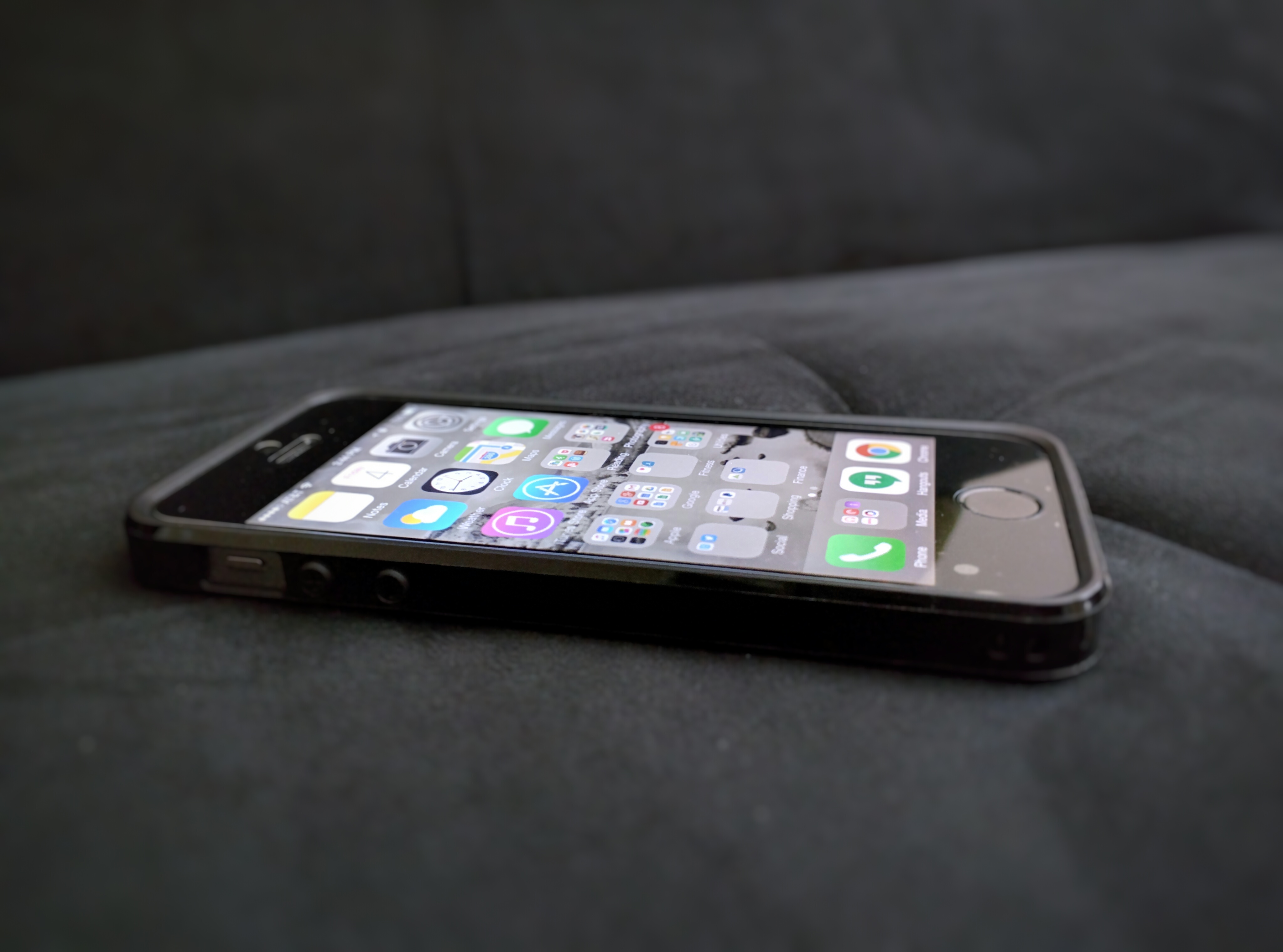
iPhone 5S.
A test, especially when you are trying to dive into a completely different world (iOS rather than Android) is nothing that should be taken lightly, can be daunting and should be of an adequate length of time to fully immerse yourself into the device and it’s ecosystem. This was a test of 7 days with certain parameters to ensure that I was fully in iOS as much of the time as I could be:
No going back to Android (Explanation: If there was an action that I could do easily with an Android smartphone, I was not allowed to do so — I had to figure out how it could be done on iOS or simply do without).
Must use the device as my “daily driver” for 7 complete days.
Cannot carry my Android device of choice (Moto Nexus 6) around as a backup.
Let the games begin!
One of the first things that you will notice about an Apple device is its attention to detail, just how well the device is constructed and trying to follow that “it just works” flow with the apps that are built in. And I must say, the apps that are bundled with the iPhone work well and are very consistent. Setting up security during the initial setup was painless with PIN to lock as well as Touch-ID, which is absolutely phenomenal (more on that later). After this initial phase, it was time to get down and dirty and install some of my favorite apps. Being someone who pays attention to iOS, apps and all major device releases, at this point we all know that the apps that matter are on all of the mobile ecosystems — so there was no hassle in finding the same apps that I had on my Nexus 6, in addition to a few other iPhone exclusives, to put on my new device. There were the must have apps: Pocketcasts, Gmail, Google, Google Photos, Hangouts (because I use Google Voice exclusively), Chrome and a few more that had to be installed first — this was all done during the night before that day that I was to begin using the device as my daily driver.
Fast forward to day number one. I unplugged the iPhone from it’s charger and didn’t really know what to expect during my day; however, there were a few things, that just in day one I noticed within hours.
TouchID is phenomenal. Apple truly got something 100% correct here, which is why this feature has been duplicated, some not as well, in other devices that are on the market today. Using ID to unlock your device is almost instantaneous it is so fast. In addition, many apps that implement security features, such as PIN numbers to access Credit Karma, allow TouchID to be your method of sign in, which is just further eliminating tapping away incessantly on the keyboard. Way to go Apple, way to go.
The App Store is really bad. I will not go so far as to say it is horrible, but it is really bad. Why?
App discovery is almost non existent here, it seems that the App Store is just overrun with games instead of apps to help make your life easier and while those are there you have to shuffle through the likes of Dungeon Boss and Minecraft to get to them.
Why are there two stores in iOS? You have the iTunes Store and the App Store. If everything was compiled into one convenient location it seems that it would make it easier on the user to go to a one stop shop.
Text is incredibly clear not only indoors but outdoors as well with direct sunlight.
Consistency throughout. Every app, regardless of how powerful you think it may be, launches in the same amount of time and it is simply refreshing. Not only do they launch at the same rate, but you get back to the homescreen (or initiating folder) at the same rate. Some might view this as boring (which, admittedly, it kind of is) but it is also very consistent. Consistency is key here when talking about iOS, it is certainly the most consistent mobile OS experience that I have had to date for these reasons. Let’s have a look at an example, shall we? There are a few notoriously bad apps in Android that seem to take their sweet time opening, while at times they are instant others leave you wondering is the app just in a bad mood today. (Here is an odd fact, these are all Google apps and they perform and look better on iOS)
Google Play Music on iOS just opens and I hate to use that “just works” mantra here, but it does. I did several performance tests here to validate my findings. I grabbed my Nexus 6 and opened the app the same time and about 7/10 the iPhone would somehow always win; however, the iPhone does not handle this app better because it opens quicker, it handles this app better because it consistently opens and closes the app at the same rate, regardless if it is being switched from or into or started fresh after swiping the card away.
YouTube on Android (to put it blatantly) has sucked for a long time, the app truly had a mind of it’s own when opening and speed was something that surely wasn’t a focal point. This has largely been fixed now; however, it still hiccups at times (which happens in every mobile OS, even iOS — more on that later). I performed the same test that I performed with Google Play Music and the results were the same; however, YouTube is not the offender that it used to be on Android.
Going back. Back buttons and back actions exist all over the mobile sphere. But does Apple get it right? Partly yes and it has nothing to do with a hardware button since the only button on the device that actually manipulates your position in the OS is home. So although Apple doesn’t have the physical back button here or on screen, developers do an excellent job at providing that navigation in the app and the experience is nothing short of spectacular. One swipe to the right, in most apps, will return you to the previous screen consistently and there isn’t much learning that needs to be done to recognize this.
Notifications are a pure afterthought in the grand scheme of things. You’d have to be pretty blind in Apple love to miss the fact that notifications were never meant to be focal point in iOS; however, this is essentially by design. Notifications come in through the Notifications tab in the pull down menu and they might as well stay there with as many swipes and taps that it takes for you to remove them! Clear all, please. Please.
Although the latest version of iOS (8.4.1) allows for probably the most amount of customization and sharing you are still limited here. I will simply say that I tried to share a picture and failed miserably. Sending a simple photo to my wife resulted in failure, so much that I just said forget it. In this case, I wanted to share a picture from Google Photos to Hangouts, which is my primary messenger since I use Google Voice; however, the share was not allowed. I was pleasantly surprised to see that I could share to another number of apps, such as GroupMe; however, you would think that as a messaging app it would allow shares to be initiated between the two regardless. (It is difficult to tell if this is Hangouts issue or if it’s an Apple issue, we can call it 50/50 for now. More on this later.).
Day to day interactions throughout the week continued smoothly. I was honestly very surprised that I was not reaching for my trusted Nexus 6 more over these past few days; but for the most part I did not need to. My apps experience on iOS has been very good, except for a few hiccups that resulted in an Apple screen during the update process of a few apps, even a few dropped frames here and there (as I stated before, every mobile OS has hiccups, this is something that some iPhone users probably do not want to admit). Otherwise, I have been flipping through apps like a pro and honestly trying to see just how smooth transitions can be when going back and forth between apps and you could probably guess how these tests went? Smooth, consistent and all resulting in a great end-user experience. Throughout installing app after app I was wondering if this would have a negative affect on battery life; however, it has been nothing short of stellar, as I am typing this my iPhone is currently sitting at a comfortable 67% battery remaining. Speaking of battery life, I cannot forget to mention that standby time is better than any device I’ve ever touched. If you take this phone off of the charger at 100% and leave it alone, you will return hours later to see it either on the same percentage or very close. Hopefully, these types of battery issues for Android are fixed in the 6.0, Marshmallow, update. One thing to note, is that it doesn’t seem like one app can kill and bog down your entire system in ways that Android apps are prone to do due to bad coding and this is likely due to the sandbox that you are placed in when using iOS which in this case is a great thing because Apple is controlling the user experience; however as noted above, controlling the UX can be a bad thing when sharing a simple picture fails. Google’s apps on are iOS are nothing short of gorgeous and one irritating part about each app is that it honestly performs better than it’s Android counterpart with the exception of GMail and Google Drive and it’s included suite of apps.
Being a big fan of music and podcasts, the built in Podcasts app was a dream come true; however, I eventually replaced it with my trusted Pocketcasts, it is still useful on its own. When it came to listening to music, as I mentioned the Google Play Music app worked perfectly and sound was surprisingly good for the one speaker that the iPhone 5S has, although at times it could be tinty and somewhat unsubstantial. I’d certainly like to see front-facing speakers on the next iteration, doubt it will happen but can a guy wish?
Enough about the overall good experiences. What are some things that truly annoyed me?
Apps that I don’t like I have no way of hiding, I am limited to putting them in folders and letting them sit there taking up valuable screen real estate. There is no way that you will like or even use every app that your smartphone ships with, it should be the users choice if they want to see it on their screen.
Next, Siri — yes, your friend Siri is absurdly terrible, aside from a few cutesy responses she can give you, this “assistant” does nothing of the such. It’s not because it cannot accept basic commands such as setting reminders but it is horrendous at voice recognition and seemingly limited in the types of results that it can display back to you.
Widgets in the Today pane are not only confusing but odd because of the fact that there are certain ones that cannot be removed (of course) only rearranged. If I don’t want the calendar there, let me remove it.
The ability to change my keyboard to SwiftKey is great; however, at certain points the Apple keyboard would just take over. Although permissions for SwiftKey were granted after installation, it was as if Apple didn’t trust SwiftKey on some password screens so it would pop up, which in turn required me to change it back again at some point after I was done entering text.
Workarounds. Some things you cannot do directly in iOS. For example, if I’m using Google Hangouts (or any 3rd party SMS app) it cannot be my default client, so apps cannot share directly in to it. So if I wanted to share a picture to it, it couldn’t be done inside of the app itself. This is even more apparent when you’re using multiple 3rd party apps. If it’s on your device it should be able to talk to anything else that is there as well. This does not hold true when in regard to every third party app, but is definitely true when dealing with Hangouts, this could a miss on Google’s behalf or it could be the fact that Apple wants Messages as the default messenger app for the OS. On the other hand. anything can be shared with GMail.
The verdict.
Do I hate iOS? No. Do I like iOS? Yes! It is great and so is Android. That is such a cliche answer; however, there are things to love about each OS and each ecosystem that their respective users live in. iOS offers a consistent, predictable experience. One in which you know what you are getting and you are OK with certain boundaries and limitations as long as your device is stable and you can reach certain apps that you need to. There was not a time that an app caused me to wonder, “Why is the app loading so slowly?” or “Why did that app not close when I hit home?” — never, iOS being a touch first operating system simply responds in a reasonable and consistent manner.
There is certainly room for iOS in my life and this is not the last time that I will carry an iPhone as this is now my personal device I will continue to use it and grow in my experience, as well as continue to use my Android devices; so, using both will work for me.
Is iOS better than Android? Is Android better than iOS? Both of these questions are a matter of choice and while one day while out with your friends putting the SIM into your iPhone might be the better choice, going for a day at the lake may call for Android. The choice is yours, at the end of the day I still love my Nexus 6 and it will be my more dominant daily driver, the iPhone will certainly make regular appearances.
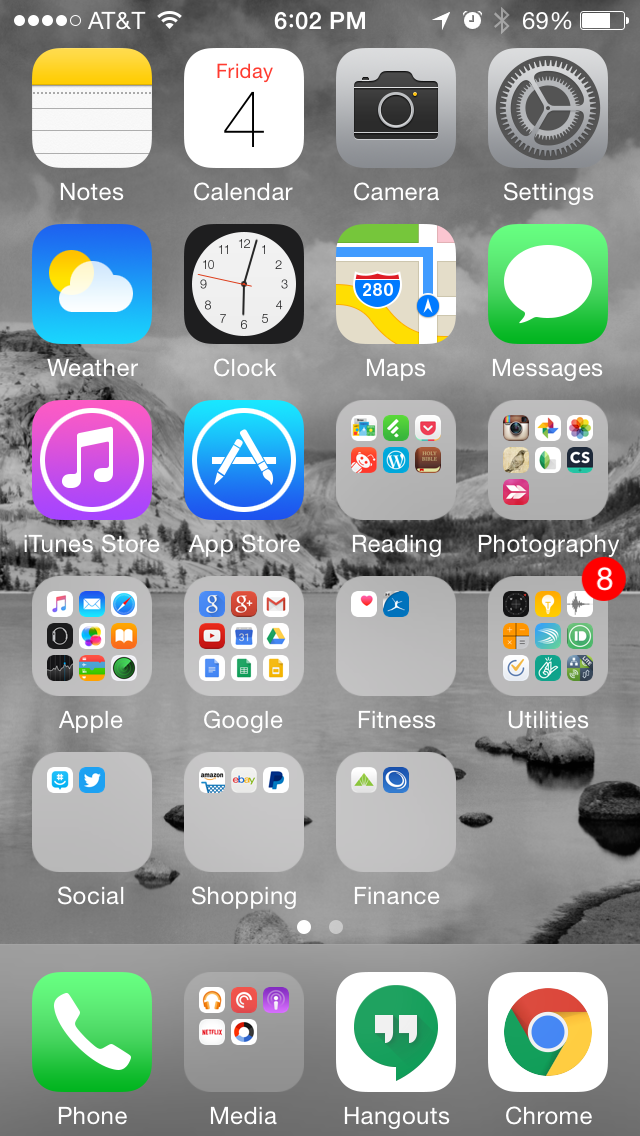
In case you are interesting in seeing my setup, see my 1st homescreen below (it’s the only one that matters, the other page only has 2 apps on it with no folders):
Android app permissions can be daunting and somewhat terrifying when you look at them. It can leave us wondering why does a calculator app need access to my microphone or contacts list. I hope that this post can put your mind at ease when installing a new app from the Play Store.
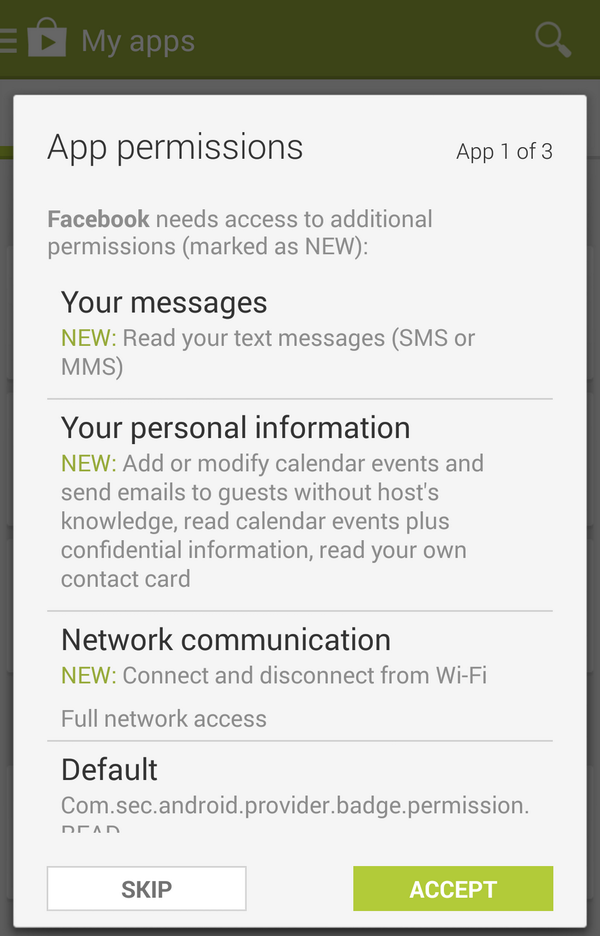
Here is an example showing the notorious Facebook app permissions below:
There is a legitimate reason that apps need access to certain hardware and list items of your device let’s break it down.
Why would an app need access to your:
Messages?
Some apps can push data directly to your SMS messages (eg. Inserting a link), without this functionality, it could make some apps far less useful.
Camera?
Perhaps you’d like to take a picture and push it straight into the app? Instagram, Hangouts and many other popular apps need this permission.
Contact list?
Apps can traverse through your contacts and see others that have that app installed and allow you to communicate with them. (eg. Snapchat). This will allow you to communicate with people that you know, just in a different way.
Storage?
Saving things to your device can be vital, this doesn’t mean that the app will read all of the contents of your ROM (if it did you’d know because it would be accessing it for some time).
Network?
If the app uses data for any type of transfer (eg. Loading lists, pictures, sending items, etc) the app will need to use your mobile or Wi-fi data.
Calendar?
In some cases you may want to export an event to your calendar. In the example above you notice that Facebook utilizes this.
Microphone?
No, your phone is not listening to you all the time. But I bet you like dictating text messages instead of tapping away while driving. Or you like to be able to do voice conferences with video.
In conclusion, although we ask ourselves why does an app need so many permissions when they utilize them to the fullest and make the app just work. In the upcoming Android 6.0 (Marshmallow) release users will be able to restrict certain permissions so if you don’t want your text message app using your microphone, disable it. Just don’t expect to dictate a message until you turn it back on!
Apps need permissions and all apps are not out to get you, especially ones that are available in the Play Store. Stay safe and watch apks that are downloaded from untrusted sources — those could harm your device; however, when it is obtained from a safe source, the app will work as designed and use the permissions as needed.
Bottom line: Don’t freak out about this stuff, your apps need these permissions to work the way they do. Removing them will only hamper your experience.
With the release of Apple’s iPhone 6, 6 Plus and iOS 8 there have been a flurry of reviews, some highly one-sided and some more favorable. On DexJohn’s PC, I aim to be non-biased and look at things from a pure technological standpoint. With that being said, let’s review this device shall we?
[This is an Android user’s review after having a brief hands-on with the iPhone 6 Plus.]
Feel of the device:
First off, the model I had time with was the iPhone 6 Plus, mentioned above, has an incredible build quality and overall solid feel to the device. This phone does not feel cheap, overly light or bulky. However, this cannot be said about the predecessor to this device, the iPhone 5/5S — this model looked well crafted; yet, after holding feels almost too light and unsubstantial (as if a breeze could whisp the phone away from your hands). Many early reviews of the device balk at the fact that the camera protrudes slightly from the back. My opinion, get over it! Honestly, when you put a high quality sensor into a device it is o.k. for it to stick out slightly on the back (hence the Nexus 5, Galaxy series devices) or either the phone would be thicker. But you wouldn’t want that would you?
iPhone 6 and 6 Plus in hand comparison.
Since I was dealing with the Plus version, I can say that although the device is the largest iPhone yet — it feels great. My daily driver is a Nexus 5 with a 5″ screen and after using devices like this and the Galaxy Note, this iPhone doesn’t feel that large. One thing to note is that bezels on this device are quite large, so many Android OEMs can put this same size screen (5.5″) into a device and it will be noticeably smaller in comparison. Unfortunately, this seems to be something that the user will have to deal with…that home button seems to be permanently cemented into iOS devices (unless Apple switches to on-screen controls).
Responsiveness and Speed:
iOS has always been responsive, that is one of the “trademarks” of the operating system. Upon the press of an app icon it almost loads immediately. Notice the word, almost. iOS and Android are built using entirely different frameworks with Android being built to mirror Blackberry initially and iOS built for ease of use. With that being said, iOS app launching and Android app launching are essentially a toss up. Here is one difference, while iOS apps launch almost instantly, the content within that app may be slow to appear (this happens in many cases). So, the user will be in the app; however, you will be waiting on content. This is almost the opposite for Android, the app and content load happen almost instantaneously. Notice the word, almost. Neither one of these mobile OSes are perfect and being the stickler I am for performance — I take note.
On the other hand, swiping and moving about the operating system are fine as always — no noticeable hiccups.
Operating System:
In this case, iOS is iOS — a lot really hasn’t changed, which may be my biggest sticking point.
However, let’s start with the good first. The fact that not a lot has changed is a good thing for many seasoned iOS users. The operating system is very familiar and inviting, not to mention easy to use. Upon waking the device, the user will be greeting with a simple UI consisting of a grid of icons, for increased functionality, these icons can be moved into folders to “declutter” the home screens since iOS lacks an app drawer. There are a few new features baked in such as voice replies on the keyboard and Apple Pay, which is essentially a new system for NFC payments — exactly how useful Apple Pay (NFC in general) will be is solely upon the shoulders of retailers.
The bad. While iOS has stuck with the tried and true, many manufacturers (not just Apple) have become content with offering minor tweaks to their “latest and greatest” products. This could have been prime opportunity for Apple to completely alter iOS and make the device that it powers more of a true mobile computer. With that being said, apps still cannot talk to each other and customizations are still essentially non-exist (with the exceptions that keyboards and a few other apps can now be modified)…..unless Apple deems it “fine and good”. One thing to note is that for this to happen, Apple may have to significantly bump up the hardware — if you compare the latest iPhone to any modern Android device, it is easily beaten in terms of hardware; however, the biggest difference is the UX that is achieved on a iOS device.
Overall, iOS itself is not bad as long as you like to stay within the realms defined by it.
Overall Impressions:
The iPhone 6/6Plus is good, darn good.
Is it worth it to upgrade if you have an iPhone 5S? In my opinion, unless you need a larger screen and NFC payments — no; however, the next iteration should be an absolute upgrade. Why? Typically, phones that were released earlier with a newer OS on the hardware (even when tuned to certain devices, which is the case with Apple) will still result in a poor user experience. However, for users that are stuck on the iPhone 4 or 5 — there is no question. UPGRADE.
iOS and Android is all up to personal preference, what mobile OS you use is entirely up to you. As there is no perfect phone, let’s rate this device:
Smartphones have become a staple in the typical “busy” person lifestyle. These neat little devices help manage our contacts, calendars and ultimately our lives. With such powerful peripherals at arms reach one cannot help but to pull their device out for a quick check.
What if you could reach in your pocket less? What if you could receive notifications that keep you plugging throughout your day that are unobtrusive and don’t make you seem rude to people you may be talking to?
The day is here.
Android Wear was officially introduced at Google I/O 2014 and this platform is looking promising from the very beginning. Android was essentially built around the premise of multitasking and notifications that allow you to get a glimpse inside of applications on your device without the constant need to open one up. Android Wear gives you the ability to see all notifications on your wrist and take action on them. This added convenience is certainly a game changer and the industry has taken notice.
Bottom line: The perfect companion to your smartphone is here. It is officially time to free your hands from your pockets and have notifications in your face that are easily managed and there when you need them.

 DexJohn's PC