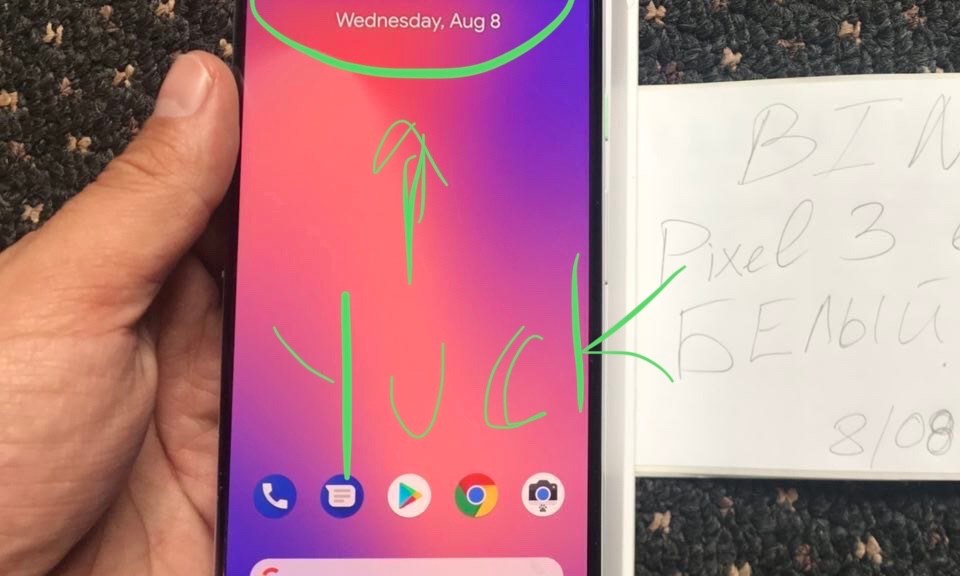
Apple killed the industry with a notch in the display of it’s beloved iPhone X, due to its True Depth Camera array for Face ID. Afterwards, it’s seemed as if every Android manufacturer, including Google wants to copy it — why?
Reception
Most people note that they “don’t even notice” the notch. However, I argue that OEMs are lying to consumers by offering a device with an “edge to edge” 6 inch screen while due to the nature of the notch and additional curves in the display make only about 5.5 inches of that display actually usable. We are in an ugly middle ground before we get real full display phones and right now, only Samsung is maximizing space properly — no one else.
This is beautiful. Not only is it useful to continue your conversations because we usually have more than one command to issue, now — as promised at Google I/O 2018, but it brings to life the realization of a more “present” assistant.
How it works?
What happens when you say the “Ok Google” or “Hey Google” wake phrase, the user will see the lights on their Google Home device light up, indicating that Google Assistant is listening. From there, a question is asked followed up by a succinct and hopefully, correct response. With Continued Conversations, this changes to an abrupt ending to Assistant continuing to listen for 8 seconds for additional commands, which it will respond to if issues or delete the audio if no commands are issued. When the user is done issuing commands, simply say “Thank you” and Assistant will reply, “No problem” letting you know that the conversation is over.
With Google arguably having the smartest assistant, the brings this digital assistant to the next level.
Google I/O 2018 has been in the record books for over a week, as it happened on May 8, 2018 — yet people are still talking about the latest in Android P, Google Duplex, Google Assistant, Google News and more — along with a healthy helping of FUD (fear, uncertainty and doubt, that’s to loudmouths from the Apple community, more on that later).
If you had no idea what Artificial Intelligence (AI) was before this keynote, it was literally said thousands of times — I hope you know what AI is now after this 2 hour dose of Google. If you’d like the TLDR of Google I/O 2018, you’ll find it below along with my full analysis:
Source: The Verge, YouTube
Google Assistant
Currently able to work with over 5000 smart devices, getting 30 languages in 80 countries by the end of the year, Google Assistant is shaping up to be one of the best, if not best digital assistants when compared to Apple’s Siri or Amazon’s Alexa offerings. Additionally, Assistant is working to be more conversational by negating the need for the requesting person to constant say the trigger phrase, “OK Google” to trigger more subsequent actions, Assistant literally will wait for a second or two, while waiting for additional input. Multiple Actions are introduced, which work with an “and” thrown in between the commands such as, “Turn off the office lights and set a rice timer for 10 minutes“.
Next came the unveiling of Google Duplex, AI at it’s finest. Google Duplex is a technology that utilizes Google Assistant to call restaurants and other places to book services for you and potentially more. Imagine the utility that this can have for those with speech difficulties and more. Additionally, with Assistant sounding so lifelike with implementations of “mmhhmm” and “ummm” — the conversation can be much easier. See a demo and reaction from MKBHD, here:
Source: MKBHD, YouTube
This where the FUD (translation: Fear, Uncertainty and Doubt) come in, usually from pundits on the Apple side such as Rene Ritchie (just Google Rene Ritchie biased, if you don’t believe me), who has a tendency to be extremely biased against any company not named Apple.
Let’s lay a couple of things out so that they can be easily understood:
For Google to parse through real time communication, the call must be recorded. With that being said, this will likely be unavailable in certain states due to law. At the end of the day, as a human, we usually can discern if we are talking to a human or not.
Assistant will announce itself when it places a call for you, read more here.
So what does the above mean for privacy? If you receive one of these calls, as a business, and you do not want to engage — hang up and move on. Google has been addressing privacy and security in many realms. Let’s note that they have one of the most comprehensive and easy to understand privacy statements of any tech company. However, this tech is coming, whether you like it or not and the usefulness of this will be huge, especially for accessibility — all the while companies like Google and others need to help ensure that privacy and security remain at the forefront.
Google News
With Google, there is constant re-branding among many of it’s products and services. Remember Nexus? Remember Google Reader? Remember the Android Market? All of these either got axed by Google or renamed. From Nexus to Pixel, Google Reader is just gone and the Android Market is now called Google Play, with Google even working to remove “Play” from many of the names of it’s apps and services.
With that being said, Google Play Newsstand is no more, in comes Google News and oh, is it great.
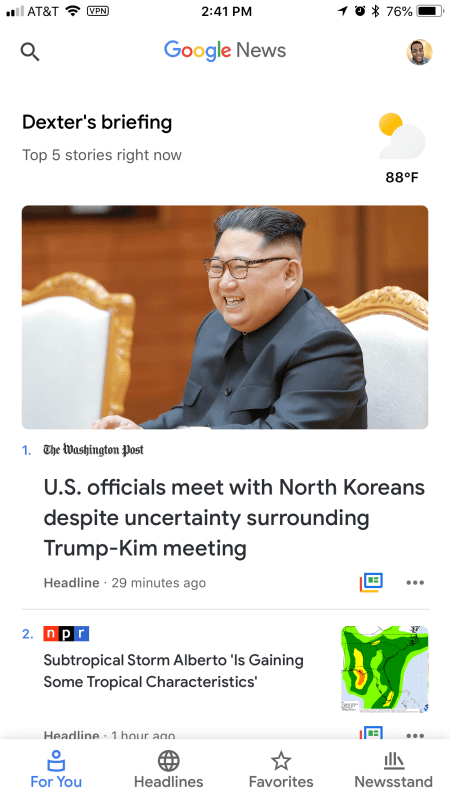
In app screenshot from Google News.
For You is all about your briefing — what topics have you added and are following, such as Apple, Android, NBA — the list goes on. What’s excellent about it is that it is a timeline of what’s happening in your world, but that isn’t where Google News stops.
Headlines takes you outside of your comfort zone. Headlines gives you the latest world, business, tech, entertainment, sports, science and health news without any bearings on your preferences, which truly brings you up to date in what is going on around you while removing you from the bubble that you’ve created with your topics.
Favorites lists out all topics and sources that you’ve added into Google News that you follow. Additionally, saved stories and magazines find their home here.
Newsstand is all about sources, you can add sources by searching or coming here.
Overall, Google News is a major win and I suggest you try it, unless you believe that everything Google does is of the devil.
Android
Android P is coming, folks and it’s going to bring some incremental changes on top of Oreo, let’s break it down!
This update aims to focus on 3 pillars: Intelligence, Simplicity and Digital Well-Being.
First up, Adaptive Battery (Intelligence), focuses on reducing the number of CPU wake-ups for apps — when these become more and more infrequent, this will reduce the amount of battery drain.
Next, we learned about Predictive Actions (Intelligence), which is all about understanding how you utilize your device so that it doesn’t take you as long to complete certain tasks. Before we go forward, all of this user data is stored locally on the device and is encrypted. Ever open your app drawer to scroll down to your favorite workout app…..everyday….at 5 PM — this is one of the things that Predictive Actions will help with. Android will learn the apps that you use and under which circumstances and group them together at the top of the drawer so that they will be easier for you to get to.
Source: The Verge, YouTube
Followed up by a beta “Nav bar”, which is eerily similar to the bar on iPhone X, just not as graceful in implementation — note that Android P is in beta and while this first implemtation includes a bit of “jank”, I’m expecting this to grow into a good design choice, hopefully.
We all deal with a bit of device addiction to a certain degree. Under that sentiment, Google will all you to gray-scale your phone after a certain time so that apps and the UI are not as intriguing to you, thus leading you to put it down (Digital Well-Being).
Maps and Waymo
Google Maps leads the way in digital mapping and updates keep making it get better and better. This years IO showed us a VPS or Visual Positioning System in which the user can hold up their phone to the world and directions will overlay on the real world.
Source: TWiT, YouTube
Maps is good for us and it’s even more vital for self-driving cars.
In comes Waymo (Google’s self-driving car project).
Waymo has been testing it’s software with an early-rider project and users are loving the tech in its initial city, Phoenix. With 6 million miles driven on public roads, this technology is only going to get better and better with the data being collected, such as “unusual behavior”, which allows the car to detect bad drivers and avoid accidents.
Source: ExpovistaTV, YouTube
Wrapping Up
Google I/O 2018 was long, fun, unneeded fear-mongering and full of excitement, which has been outlined above . However, there are some things that I didn’t mention, so feel free to watch this wrap up video, from Google Developers:
With Mark Zuckerberg and Facebook facing incredible scrutiny from the United States government, to Apple’s Tim Cook calling out the company and industry insiders lining up to tell you to delete your Facebook account are we missing the larger issue with privacy?
Background
I’m here to argue that most consumers, especially those arguing against Facebook and standing up for other companies, care about privacy inside of pockets. What do I mean? Let’s look at those who side with a company, taking Apple and Tim Cook here or if you’re siding with any company without first taking into consideration privacy as a whole. Let’s ask some important questions:
Are all of your customer facing sites tracker free?
Do you encourage end users to utilize VPNs to mask their online traffic?
Do you offer dashboards with full insight to the data that is collected on your users?
How clear are your own privacy policies?
The internet itself in 2018 is almost not private by default. It’s a sad reality, but it’s the truth. Seemingly harmless websites are stuffed with ad trackers causing slow page loads and hampering the overall experience all while gathering plenty of analytical data for the site owners to target you — even sites of publishers claiming to care about your privacy.
What to do
Do not trust any entity. There is no company on this earth, including Apple, Google, Amazon or others, that deserve your complete devotion to their security practices. You should scrutinize each and every company, especially those that say they value your privacy. So what can you do in a world that is seemingly less and less private?
Always look for third party alternatives and don’t just settle for what companies offer.
Host your own solutions.
Research and stay up to date on the latest privacy and security solutions.
Engage your friends and family to encourage them to take on extra security methods.
Conclusion
This is a hard topic and one this will be increasingly difficult to manage and maintain as more and more online systems are integrated into our lives; however, with diligence we can maintain a decent level of privacy and security in our lives — it just takes time and effort.
On March 27, 2018, Apple let the world know that it aims to take on education. There are numerous reasons as to why getting into education is a good thing when you’re a large technology conglomerate:
Device infiltration from an early age, thus creating Apple users for life
Competing in a new area
For some time, Google has been dominating the classrooms with the help of their Chromebook line. These inexpensive, easy to configure and deploy laptops running only the Chrome browser (Chrome OS) are a mainstay in American schools because they are so affordable and Google services are free (we always pay — even for free services, more on that later). While Apple has always wanted to be in the space, the company has yet to show how fully committed they are to providing tools that schools and administrators find useful or affordable.
Overview
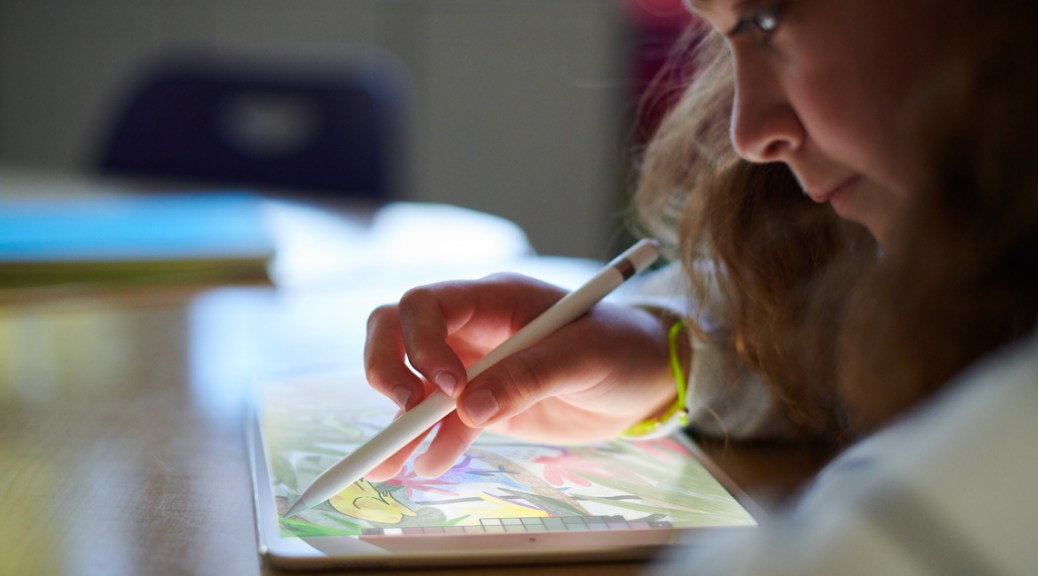
The highlight of this event is an all new 9.7″ iPad, coming in a just a little over one pound, that supports Apple Pencil, which is a big deal and will likely cause increased adoption of this new iPad by those wanting to use Pencil. The device starts out at $329 for consumers and $299 for students. This updated tablet features an A10 Fusion SOC, which is the same as the iPhone 7 and should provide lasting performance for years to come. In addition to the Apple Pencil, Apple partnered with Logitech to create the “Logitech Crayon”, which will be available for $49, which is half of the price of Apple Pencil at $99 ($89 for students). Logitech also created a rugged case, featuring a keyboard for $99. This lower cost iPad does not feature the set of pogo pins, which would allow the attachment of Apple’s keyboard cover used on iPad Pro models.
In addition to the smaller hardware announcements came big changes on the software front in iWork featuring updates to Pages, Numbers and KeyNote — all featuring Apple Pencil support. One feature to note is “Smart annotation” to bring markup to Pages, which has been available for some time in other competing apps such as Google Docs. Teachers will now have the ability to create digital books in Pages, which could be shared with students. A feature that we’ve long asked for, Shared iPad, will be available for students featuring an interface where the student taps their picture and they are thrust into an experience designed for them because it will have all of their apps and settings available, regardless of device. All of the Apple IDs created for students will be done through Apple School Manager, which can create 1500 IDs in under one minute. Remarkable. In the future students will be able to get handouts and more from their teachers in the Schoolwork app and be further managed in the Classroom app for Mac, which will debut in June and all work done within these apps will not be accessible by Apple.
Issues
Apple has done a great job playing catch up; however, there are still lingering problems that I see in this approach. While the 9.7″ iPad will only cost a school $299, there are Chromebooks that cost $150 — while Apple will never say outright that they are competing against Google, the truth is they are. In addition to the fact that in order to gain a full experience you need a pencil and under certain circumstances, certainly as the children get older and the type of work changes, you need keyboard support. See a sample cost breakdown:
Apple iPad 9.7″ $299, Logitech Crayon $49, Logitech Rugged Case $99, bringing the total to $450
Any budget Chromebook $150-200, consumer purchase, note that a school will pay less
So for the experience that Apple is displaying, it will cost over 50% more (in fact, Apple Pencil itself can cost up to 66% the price of a Chromebook) when the end goal is the same, putting technology in the classroom to shape our future generation.
Wrap-up
Apple has made headway into education now by fully marketing towards educators; however, I feel like they’ve still missed the mark because the deployment of one iPad alone without any other accessories still costs almost double the price of one Chromebook. It would’ve been nice to see them hit a $200 or $250 pricepoint here and with services that never seem to fully pan out — I struggle to see this changing Google’s lock on education any time soon. The hard truth is that if Apple wanted to create a true low cost competitor in this market for schools, they could — but as this announcement has shown us, they simply have not.
Additionally, many fans wanted to see a new iPhone SE or MacBook Air — this was an education event, for those of you who wanted those devices they may or may not come at a later time.
Tech for the masses, meant to empower, educate and inform by Dexter Johnson.





 DexJohn's PC