Protecting Your Digital Life, 2017

It’s 2017 people, ads are everywhere, malicious software is everywhere, eyes are everywhere and they don’t necessarily want your money.

Data.

Data is one of the most important things that many give to so many companies so freely; however, it can have some of the most dire consequences.  A simple first name, last name and email address can be used to figure out what state you live in, your address, telephone number, voting statistics and more.  The horrible part is that we agree to it!  Have you ever really sat down and read a ToS (Terms of Service) or Privacy Agreement for an online service that you sign up for?  There are no truly free things on the internet — when you don’t pay, you and your data are the fees.

In the below, I’ll break down the common attack surfaces in which you need to protect yourself by describing in detail what they are and giving you ammunition in your fight for your RIGHT to online and digital privacy.  (Remember, contrary to popular belief by friends, family, and employers — you have a right to your privacy.)


Apps & Software

Why start with apps first?  Simple.  We are on our phones from the moment we wake up checking Facebook (I’ll make you terrified of them later) until we lay it down at night.  What a better way to protect yourself from malicious apps than not installing them at all?

When you are browsing your App Store of choice for that next big thing there are 4 things to consider:

  1. Who made the app?
  2. Are there common issues which are seen in the ratings/about section that you should be aware of?  (Such as update date, constant bad reviews, etc)
  3. When agreeing to the Terms of Service, what do they actually say?
  4. Upon installation what permissions does it need? (Location, Camera, Microphone)
    1. Note that denying access to one or more of these permissions could cause the app to not work properly, but that is a cost we can pay for increased privacy and security.  My recommendation is to give apps the least amount of permissions at first, then add when necessary while never giving access to Location Services unless you fully trust the app, most apps simply do not need that level of access

I do not expect you to read the Terms of Service or Privacy Agreement in full for every app, some are simply too long.  However, there are keywords to look for that I advise you to check (use the Find command, if you are at a computer Ctrl + F brings up this search) before agreeing to use a free app again:

  • Data
  • Personal
  • Privacy
  • Usage
  • Share
  • Third-Party(ies)

If you do keyword searches on these and they comeback with hits, read the selected sentences and agree to those terms only if you are satisfied and agree with the potential risks, if any.


Service Providers & Snoops

Your internet service provider (ISP) might be one of your biggest foes, little did you know.  Whether you are on wifi at home utilizing Comcast’s services or on the go with a blazing fast LTE connection from MetroPCS, Verizon or another cellular carrier — your ISP can track your every move and they want to sell your data.  Additionally, there are malicious actors on the internet that can act in the middle of the router you are connected to and the internet itself (which is why it’s never good to join wireless networks you are unfamiliar with) and can see your data while it is being sent and can even manipulate data and images that you see — this is called a “Man in the Middle Attack“.

It may seem that there is nothing you can do, but there is and it’s fairly simple to implement and will cover most of the security risks above.

VPN. (I’ve talked about this in depth previously, please read all about it)

A VPN connection creates a secure tunnel between your computer and whatever item you are accessing on the internet and your machine uses the remote computer to do it’s online surfing.  What does your ISP see?  They see absolutely nothing.  They can tell that you are connected to “private host A”; however, they cannot see the contents of the data being transmitted — they see a garbled, encrypted mess, which is exactly what we want!  You can even use a VPN to alter your location, in many cases, media providers like Netflix and others do not like users to utilize a VPN or proxy to connect.
IMG_1235
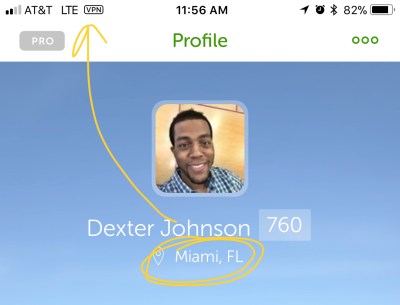
Example of how a VPN connection appears in the system status of iOS and showing the user’s location is altered. (You just have to trust me when I state that I don’t live in Florida)

Ad Companies

Facebook, Equifax, Google and others  have developed a bad wrap for their potential data selling in the marketplace.  (Let it be known, as I’ve stated before Google doesn’t sell your data or “follow” you around the internet, they primarily sell access to you in the form of ads that you see based on information that you provide — remember those Terms of Service agreements that you likely didn’t read?  It’s documented there.)  Google may not be squeaky clean, but they are leaps and bounds better than people give them credit for in terms of security and privacy.  The company offers dashboards for the end user and allows you to customize every piece of your experience and what types of data (if any) are collected.  Read their privacy policy here as well as a previous DexJohn’s PC post about their privacy stance.

On the other hand, companies like Facebook are a little more nefarious.  Ever heard of Facebook Pixel!?  Of course you haven’t, because it’s designed to sit in the background, installed on your favorite websites, and watch your every move on the internet and serve you “relevant” ads whether you are a Facebook user or not.


Hardware Protection

We walk around carrying priceless data on our devices, from friends and family information including notes, phone numbers and addresses, not to mention personal passwords and more, which should all be kept in encrypted form either on device or in the cloud.  There is absolutely no reason to not have a passcode on your device, whether it is a mobile device or laptop.  Protecting your hardware is one of your first defenses.  Take this example, you have no password protections on any app on your device; however, you have a lock-screen password — at least you’re somewhat safe.  Create a password that has a combination of letters (upper-case and lower-case), numbers and a symbol (my iPhone password is over 20 characters long).  Your password doesn’t have to be as long, as long as it is complex and something that you can remember.  If you need help creating a secure, complex, lengthy password visit here, shown below:

Screenshot from 2017-11-08 12-48-30
Screenshot from http://passwordsgenerator.net/, showing the complexities that can be programmed.

Recommendations for Security

To be private and secure one cannot simply utilize the tools that are available on his or her mobile device or machine.  Only through a set of secure apps and protocol can one travel down the road to increased privacy.

  • Password Manager — A password manager is essentially for your privacy and security.  There are several options where you password database are stored in the cloud such as LastPass and 1Password, while there are offline options, which are considered more secure, such as KeePass.
  • VPN — A VPN is necessary for masking your online activities (just because you’re masking because of privacy DOES NOT mean that you are doing nefarious activities) from your ISP, attackers and services online.  Some options that are prasied are PrivateInternetAccess, Proton VPN, IPVanish and more.
  • Terms of Service Help — Ever heard of “tldr” or too long didn’t read?  There is also tosdr for Terms of Service Didn’t Read and this website can help you understand what it is that you’re signing up for.  Additionally, while reading and agreeing to privacy statements, be sure to use my Find and search technique, outlined above.
  • Chrome/Browser Extensions — We all use one of big browsers as our gateway to the internet.  Add these extensions to hamper tracking by Facebook and eradicate insecure connections.
    • HTTPs Everywhere — an extension created by the EFF and Tor Project and it switches sites from http to https, which is secure.
    • Privacy Badger — Blocks ads and invisible trackers
    • Ghostery — Protects you from trackers and optimizes the web
    • Facebook Disconnect — Blocks Facebook ads from Pixel and its potential tracking of your traffic all over the web
    • AdBlock — Blocks obtrusive ads on Facebook, Youtube and multiple place

Wrapping Up

Remember, these are all tools to add to your privacy and security arsenal and is in no way a complete list or a complete listing of products I use — just ones that I consider essential.
iPhone 8 Plus Hands On

Short story here, it’s an iPhone people. It’s an iPhone. But this isn’t necessarily a bad thing.


Design

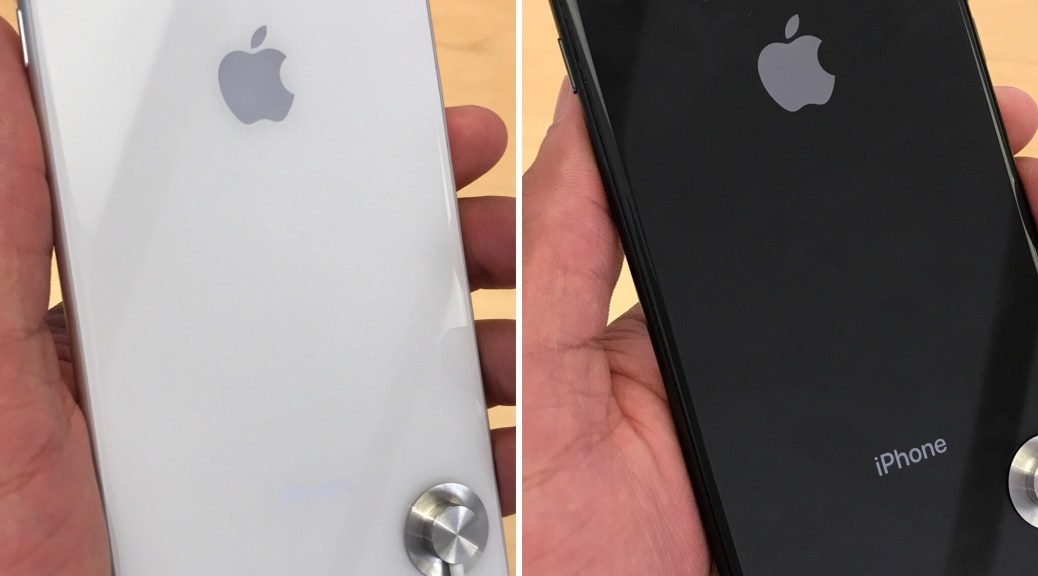
The design of iPhone 8 and 8 Plus is largely unchanged from it’s predecessor, maintaining a familiar body, weight and style even allowing for previous generation cases to fit perfectly on the new devices. Immediately upon picking up the device you notice the glass back, allowing for inductive (not wireless) charging, giving the phone a slightly grippier feel compared to that of iPhones 7 and 7 Plus as well as further hiding antenna lines commonly found on mobile devices.

The glass back truly brings in “peak” iPhone design.


Features

First off, don’t let anyone tell you that the newest devices from Apple aren’t worth your attention, sure they look similar, but internally there are changes throughout. From finally adding QI “Wireless” charging, the new A11 Bionic SoC and new camera specs — we’ve got a true update on our hands.


Should I Buy It?

Question of the day. If you’re coming from iPhone 6 or 6S (either model), there is NO question here — open the Apple Store app or go to your closest store and buy one of these phones. If you have an iPhone 7 or 7 Plus, you may want to reconsider. Could you upgrade? Yes, and I surely won’t stop you from handing Apple your money, however with the 7 still being extremely capable — just use your best judgement.


Overall

It’s a good device. Apple delivers year over year some of the most refined and consistent devices, iPhones 8 and 8 Plus are no different.

Made by Google Event 2017

Google has done it again.  They got on stage, as only Google does, and have shown us an array and beautiful new products that will be available in a few weeks, Fall 2017.


Google opened the event with Sundar Pichai expressing sorrow for all of the recent events taking place in the world, from the hurricanes that have swept through coastal cities and islands to the act of terrorism in Las Vegas.  From there it was back to back product announcements that showed the prowess of Google’s machine learning and artificial intelligence skills, in addition to their growing maturity at “Made by Google” hardware.

Google Home

Users of the Google Home love it, from the ability to start playing songs from Google Play Music or Spotify, to playing a YouTube video directly on your ChromeCast enabled TV, Home does an amazing job at connecting you to your “things”.  Updates to Google Home and Google Assistant including the following:

  • Voice Match — Google Home will now identify all users of the device, simply by their voice.  This means that you and your partner’s contacts do not get mixed up when trying to place a call or calendars don’t get intermingled when asking about your day.
  • Integration into an array of new Nest products, while connected will allow the user to view the stream of an entrance to a home and more all from the power of their Voice.

Updates to the Assistant that’s built into Google Home surely mean a new device right?

Absolutely.

Enter Google Home Mini.  The Google Home, in a smaller package, all for $49 and housing the power of Google Assistant.  This could turn out to be a huge game-changer for Google in their quest to capture the living room.  (Especially since this device is included with purchase of another that was released later, read more below.)

Source: The Verge


Google Home Max

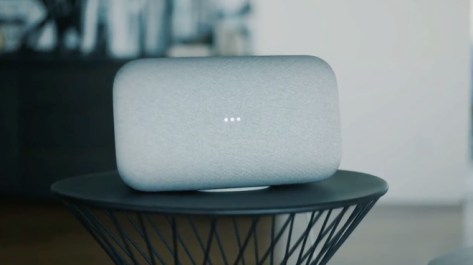
Ever wanted a speaker that really “thumped” with the power of Google Assistant baked in?  Meet Max, the newest member of the Google Home family.  Starting at $399, this is a powerful (20x more powerful than the standard Google Home) speaker that’s meant to take on Apple HomePod, Sonos and others.  The device features dual 4.5″ subwoofers for deep bass pulses, a sturdy housing, which means no creaks from the speakers, custom tweeters and acoustically transparent fabric.

Google Home Max listens to where it is in the room and adjusts the audio to just the right levels so that it’s output is perfect for any room.  Additionally, the microphone is extremely sensitive, so it allows for the user to interact with the device without the need for yelling and shouting.

HomeMax_23109-28810-Screen-Shot-2017-10-04-at-124601-PM-l
Google Home Max.

Starting at $399.


Google Pixelbook

Chromebooks, we’ve all heard of them.  How about the fact that now, every child in a classroom can have their own personal laptop — thank Google.  How about the fact that you now have a device that can be essentially virus free with a keyboard — thank Google.  Also, how about the fact that you are  one sign-in away from all of your content, bookmarks, movies and email — thank Google.

Source: The Verge

These are just a few things that make the Chromebook an excellent device, but Google had to make one too.  Say hello to the Pixelbook, the all aluminum, 10 hour battery, core i5 and i7 packing, glass trackpad wielding laptop from Google.  This device is nothing short of beautiful and of course, this is the first Chromebook experience where Google Assistant is baked in.  Additionally, many Android apps are coming out of beta and should run smoothly with powerful Intel chips behind them.  Google is really pushing Chrome OS hard here, especially with the latest feature of this device, which allows you to tether automatically if you have a Pixel phone nearby and wifi signal isn’t strong — Instant Tethering.  Throw in the Pixelbook Pen, which allows you to annotate, pull out content and more all with the lowest latency currently on the market.

Source: Made by Google

Starting at $999 for Intel Core i5 with 8 GB RAM.


Google Pixel 2 & Pixel 2 XL

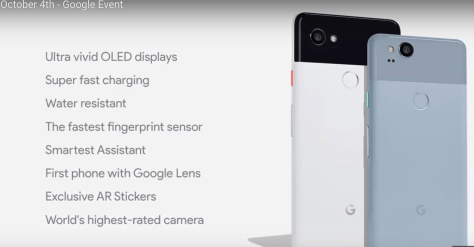
Building off of the success of the original Google Pixel and Pixel XL, which featured arguably the best camera on an Android device and maybe on a smartphone (Don’t believe me? Look at some pictures for yourself!) Google gives us Pixel 2.  Below is a breakdown of specs:

Pixel2_Screenshot from 2017-10-04 19-48-31
Google Pixel 2 & Pixel 2 XL key specs.

This device looks to have packaged all of the good things of “Pure Android” into a device that just works for the end user adding no gimmicks, just a device that works well without the extra bloat of apps that are trying to replicate a standard Google experience.  Additionally, adding water resistance to this years’ model is huge, which is something I have vocally criticized numerous times due to the fact that Google charges a premium for a device; yet, can’t protect us from a splash….Really?

Similarly, Google has added Portrait Mode into the camera software, which will allow the user to capture photos with realistic (one shot they showed on stage was brutally awful) shallow depth of field.  Pixel 2 is able to achieve this without the need for a second lens due to how the camera captures pixels of the shot and of course some excellent AI.

Overall, the product looks to be a top-tier device that is in contention for Android device of the year.  As said in the below video, “We make it look easy!“.

Source: Made by Google

Starting at $649 for Pixel 2 and $849 for Pixel 2 XL.


Google Pixel Buds

Wireless ear buds with the intelligence of Google Assistant built right in, giving you the capability to translate on the fly.  Yep.  That’s pretty fancy and they are here, built by Google.

Source: Android Authority

While the earbuds are not single ear buds like Apple Airpods, they are tied together; however, the buds follow a similar design scheme that we’ve seen from other Made by Google products.  Since Google Assistant is on board, a quick swipe of the right bud will get you access and you’ll be able to jam out or chat with Google for an estimated 5 hours per day while the case can further charge the headphones.

Google-Pixel-Buds-crop-780x445
Google Pixel Buds (shown in case)

Starting at $159.


Google Clips

A small camera, designed for parents and pet owners alike — that’s built to capture those special moments, with privacy built in that only saves “clips” once you’ve confirmed and stored on the camera fully encrypted before it’s transferred.  Clips is a “smart” camera and recognizes expressions, the appropriate lighting and framing of it’s objects — all automatically when the camera recognizes something that you’d like to capture all while being in the background and non-invasive (no microphone and an indicator light that shows when it’s on).

As you see, this camera is focused on freeing the user from the device and has an emphasis on privacy, something of which people think Google takes for granted — read their privacy policy if you believe that.

Starting at $249.

Source: The Verge


TLDR

Google announced an impressive array of devices, which time will only tell if the company will continue taking hardware seriously — for now and the past couple of years it has by creating solid incremental updates to existing devices and pushing out thoughtful new ones.

Good job, Google.  Good job.

Samsung Galaxy Note 8 First Impressions

Enter Galaxy Note 8.

There is a lot of chatter about this phone; however, one statement that is not being put out into the atmosphere is, “This is not a good device.”  The Galaxy Note 8 is a wonderful device through and through.

IMG_0941.HEIC
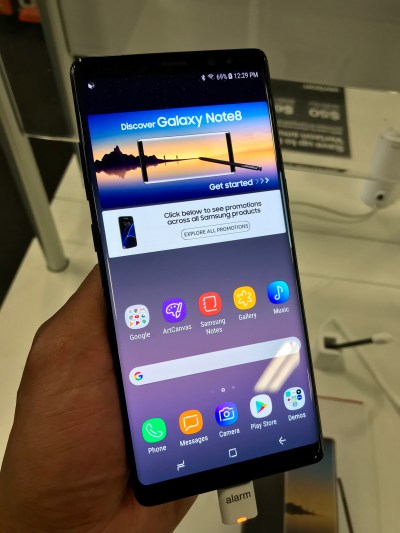
Samsung Galaxy Note 8.

Hardware

The Galaxy Note 8 feels great in the hands and it is simply amazing that Samsung managed to package a 6.3″ screen into a body of this size (close in size to an iPhone 7 Plus).  Since the device has a glass front and back, it is very grippy and easy to hold — so although it’s size may be unwieldy to some, is easy to hold in one hand.  Additionally, although the screen is large, it is slimmer than most devices coming in at only 74.8mm wide.  We are looking at a smartphone that has 6 GB of RAM, 12 MP dual-camera system (OIS on both sensors), USB-C, a headphone jack (yes, I have to mention it), S-Pen (more on that later), IP 68 water and dust resistant, a bottom firing speaker that actually sounds really good, Fingerprint scanner (in the wrong place right next to the camera,  this is the only part of the design that is flawed, which ruins the look of the back of the device) along with a Super AMOLED display that is simply one of the best, if not best, in the business.


Performance

You can put the best specifications in the world, the most RAM the fastest processor and still have a terrible smartphone experience, many Android OEMs have been guilty of this in the past, including Samsung.

Not this year.

With my time spent with the device, the phone flat out screamed from the moment I picked it up, until I put it down.  One area of the operating system in Samsung’s “Samsung Experience”, renamed from TouchWiz that appeared to be much more optimized was simply opening the Camera app.  Nearly all Samsung phones of the past would experience a little lag when opening the app — yes, it’s a big deal a moment is exactly that, a moment and something that you do not want to miss out on one.  Opening apps, closing apps and multitasking were absolutely painless making  this phone very performant.  One of the only pain-points I saw in regard to performance was swiping to the Bixby page at the left of the launcher, nearly every time (even when it was loaded into RAM) it opened the phone was met with stutter and dropped frames.


Samsung Experience

Most Android OEMs add a few apps, launcher changes and more to differentiate their flavor of Android from it’s competitors and Samsung does it in a very tasteful and refined manner on the Note 8 with highlights on two in particular.

Edge Apps

Because of the Note 8 screen technology, wrapping over the edges to meet the bezel, Samsung makes use of this with “Edge Apps”.  Edge Apps allows to to select from certain “predetermined” apps on the device and create shortcuts to those from anywhere in the operating system.  Really love that Samsung Notes app?  Put it in the edge and you’ll be able to take notes from anywhere in an instant.  Additionally, we now have App Pairs, which were introduced with the Note 8 and this allows you to pair commonly used apps together in a “pair” that will be launched together in split screen mode (6.3″ screen here, really making use of the extra real estate).

IMG_0944.HEIC
Samsung “App Pairs” shown, above. (Note: In my experience the device did heat up a bit when two apps were on the screen in App Pairs.)

S Pen

While it is unknown of the actual usage statistics of Samsung’s S Pen, it is certainly a valuable addition to the device and where it gets its “Note” name from.  The S Pen makes it easy to jot down notes quickly and efficiently.  The phone doesn’t even have to be awake.  Need to capture some info?  Pull out the S Pen from the device, and start writing on the screen with “screen off memos” — these will be saved to a new note ready for you to reference later.  The S Pen does have it’s drawbacks, as the input lag is real here when drawing lines on screen and is somewhat intermittent when swiping between homescreens.

Source: Tim Schofield


Camera

Since when have you ever known of Samsung to slouch in the camera department?  It started this year, kidding.

The Note 8 takes fantastic shots.  With my experience, under Best Buy lighting, the pictures were crisp, focused and contained plenty of detail.  Video capture was nice and smooth as well; however, playback appeared slightly choppy on the Note 8.  Check out this very thorough camera review below:

Source: Andru Edwards


Nitpicks

There is so much to like about this device; however, I’m yet to have a perfect smartphone experience (seen my rants on iOS 11 lately?).

Let’s get this over with:

  • Smaller battery than the smaller Samsung Galaxy S8 Plus (likely due to battery issues in the Note 7)
  • Some photos appear to be over saturated, while pleasing to the eye, these pictures are not the most “true to life”
  • Disappointing S Pen performance lag

TLDR

Right now, the Samsung Galaxy Note 8 is the best Android phone that you can go into a store and buy, period — no questions people.  The overall package of performance, camera quality and excellent build make it an all-around winner.

Apple Watch Series 3 Impressions

Anyone seen the roadrunner?  Of course, you haven’t, because it’s on my wrist.  The biggest upgrade with the Apple Watch Series 3 is it’s responsiveness and battery life improvements.


Overview

Coming from the original Apple Watch (lovingly known as Series 0), the speed increase is huge with Series 3 with GPS.  Not only is the hardware much improved internally, watch OS 4 brings out the best in it.  From an improved workout app, Siri on board and a carousel of complications — this is a solid upgrade.  It is also reported that the speed increase is even notable from Series 1 and Series 2.

EEE02C7C-83C4-4DDF-B700-2D170E8DF3F5


Speed

Speed increases are the biggest and best thing about the new Series 3 watch and is seen from the moment you raise your wrist from the moment you lower it.  Even the most mundane and simple tasks such as swiping from watchface to watchface, opening an app and more — say goodbye to frame drops and hello to a perfectly smooth smartwatch experience.


watch OS 4

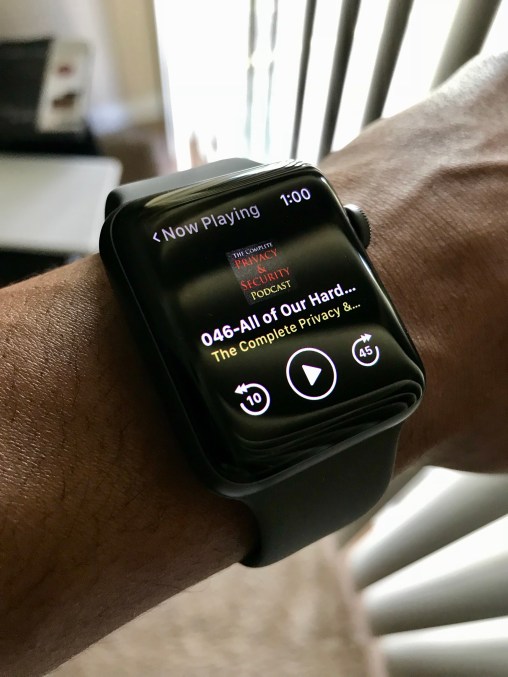
What does watch OS 4 bring to the table besides the very useful “Now Playing” complication?  First off, Now Playing is an excellent addition and automatically puts your media front and center on your watch when there is something playing on the iPhone, just makes sense.

IMG_0929.HEIC
PocketCasts app shown above.  The Now Playing screen is similar and accommodates to media coming from your iPhone.

With Siri here, she can actually respond to you with her voice, which is only due to the new processor in the Series 3 device.  Apple Watch is an industry leading fitness device and the OS upgrade brings updates to the Workout app with more workouts to choose from an integration into new machines that will be coming to a gym near you.


Battery Life

Unbelievable. The upgrade from Series 0 to Series 3 is massive in this respect. Since purchase, I’ve gone to sleep after having it off of the charger all day with the battery at 84% and woke up with the battery at 77% — that is with light to moderate use the previous day. Just note that if this was my Series 0 it would’ve bit the dust overnight….


TLDR

Apple Watch Series 3 with GPS or with GPS and LTE are both considerable updates to the Apple Watch line and highly suggested if you’re in the market for a new wearable device.

Tech for the masses, meant to empower, educate and inform by Dexter Johnson.