Tag Archives: google

Determining the right smartphone for you

iPhones, Galaxies, G4s, Xperias, Lumias, Moto — those are just a few of the names that you hear when it comes to that time of year for you to consider buying a new smartphone.  First things first, let’s clear the air and recognize that Android 6.0 and iOS 9.2 will get you to the same destination, one may require more or less clicks, one may look better or worse and one may look the same or widely different depending on the device but the end result is the same.
Now that that is out of the way, let’s break down the important components of a smartphone purchasing decision:
  • Amount of money that you are willing to spend, Price.
  • Ecosystem preference.
  • Peripheral preference. (things like USB, lightning, etc.)
  • 3rd party support.
  • Power user or simple user.

Price
Apple puts iOS on devices that they build — that’s it; so, in a nutshell, one must conform to their prices and they can get expensive.  One thing to note is that Apple focuses on really marrying the software and hardware together to create one of the finest smartphone experiences that money can buy.  When it comes to Android devices, prices fluctuate all over the place from the biggest flagships such as the Galaxy S6, Galaxy Note 5, HTC One M9 and more you will pay top dollar.  However, there are mid-range devices that can sometimes give users just as good performance without completely emptying out your pocketbook.
One important note, do NOT buy a cheap Android device (something less than $250 or something sold in Walmart) then complain to all of your friends that Android is not a great operating system.  The problem here is that you as a buyer, made a poor decision when buying your device (find another tech site willing to share that truth with you).
Quality and performance come at a price.
Ecosystem Preference
Some of us have large iTunes libraries with music going back to the days of the first iPod, while others cannot live without GMail, Google Keep, then you have others that simply need the embeded support of Microsoft’s suite of apps — everyone is different.  With that being said,the Apple App Store and Google Play Store largely have the same apps and games; however, please expect most apps to be developed and arrive first on the Apple App Store.  This is not due to an embedded hatred for Android it is due to the sheer number of devices that a developer has to account for when creating an app, versus iOS being on similar hardware at all times.  One thing to note here is that Google typically makes all it’s it’s services available on multiple platforms while Apple does not — with the exception of Apple Music appearing in the Google Play Store.
The Windows Store is really missing key apps though, examples are Instagram, Google Chrome and more — this shows that developer support as well as user support really is not there.
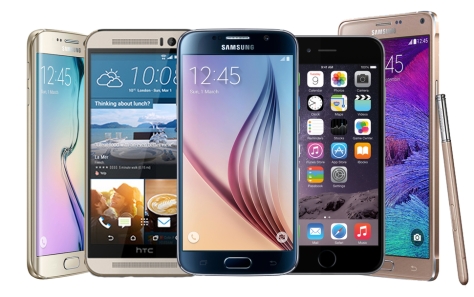
Popular smartphones from 2015.
Peripheral Preference
USB is an industry standard.  Standards are good and are largely used and promoted by more open companies such as Google.  Apple, although screaming of quality, locks the user in here with a lone lightning port on the device alongside a 3.5 mm headphone jack.  Chargers and charging cables cannot be shared with anything that is not an Apple device.
Third Party Support
Literally everything you see from third parties are made to support Apple’s latest and greatest flagship device.  As noted above, this does not happen because OEMs dislike Android or Google, it is because iOS is only on a select group of devices, while Android phones and tablets can come from literally any OEM that gets the required certification from Google and others who do not.  Meaning, it is simply easier to adapt or provide an interface from an iOS device rather than account for each and every smartphone running Android.
Power user or Simple User
While some power users enjoy iOS, for those of you who love to tinker and have control of literally every part of your smartphone — the choice is simple, go with an Android device.  However, with great power also comes great responsibility.  Having an open platform means that you as the user could change a setting that leaves your device running a bit slower or even a bit faster.  One can setup the homescreen in any manner that they like in addition to even creating custom gestures and assigning actions.
If you like to take the simple approach to a smartphone, you really don’t care about customizations other than a case and just want your device to work day in and day out — the choice is clear, go with an iOS device.  The way that iOS and Android are built are fundamentally different and that is key here because apps only interact with so many layers of the operating system, which makes some apps somewhat limited; yet, this focuses in on providing a clean, consistent and sometimes less cumbersome experience.
Conclusion:  The choice is yours!  Do you have an unlimited bank account, do you like to trick out your homescreens or would you rather be consistent and reliable.
Two great ways to reach the same destination, just choose your ride!
It’s 2016 and Android still has memory leaks

What is a memory leak you ask?  Here is the definition from Wikipedia: In computer science, a memory leak is a type of resource leak that occurs when a computer program incorrectly manages memory allocations in such a way that memory which is no longer needed is not released.


Google, why hasn’t this been fixed?  It has been over 1 1/2 years since a memory leak was introduced in Lollipop, Android 5.X.  Why is it still in the latest and greatest version of Android Marshmallow, which is 6.0?

What can a memory leak do to your Android device?  From making it virtually unusable, it can also make it slow and very sluggish, which would force the end user to restart the device to ultimately correct the processes that are not correctly releasing memory back to the operating system.  This is a very frustrating process because it occurs without any warning.  Let’s face it, even with Android devices being made with 3/4GB of RAM, the OS still utilizes over 80% at any given time, which is good; however, the problem lies when the device gets down to it’s last couple of hundred of megabytes and processes are gasping for more memory that they will never get.  Memory on Android is a very confusing topic and I suggest that you do your own research on it; however, to briefly outline it:

  • Android automatically manages memory while your apps are running
  • There is no need, ever, for a Task Killer
  • Apps come into memory, grab the resources that they need
  • When an app is closed and is left unused for some time that memory will be released and be available to the operating system again

The important thing to note about all of these above steps that happen at the operating system level is that they should happen automatically.

It isn’t and it needs to be addressed now.  A very poor user experience is achieved when a user has to restart a device in order to get it to work properly.

Android-5.0.1-memory-leak-discovered-fix-under-works

Android 5.1 on the Nexus 6

This update, in not so many words, in phenomenal.  In short, Google took a fast phone that performs well and made it fast-ER and perform even bett-ER.

First off, the Nexus 6 is a quad core device; however, out of the box on Android 5.0 the Nexus 6 would only utilize 2 of the 4 cores in the device for any task.  This could easily be pointed out by bringing up and app such as System Monitor and view your CPU processes.  Now, this device utilizes all of the cores and it is a stark difference.  Recents appear instantly after a button process and overall everything just seems so much smoother as if this is the way it was meant to be to begin with.

Screenshot_2015-04-17-12-54-32


In conclusion:  The complete user experience is overhauled by being able to utilize all cores of the device, which we should’ve been able to use from the beginning.  Excellent job Google, excellent job!

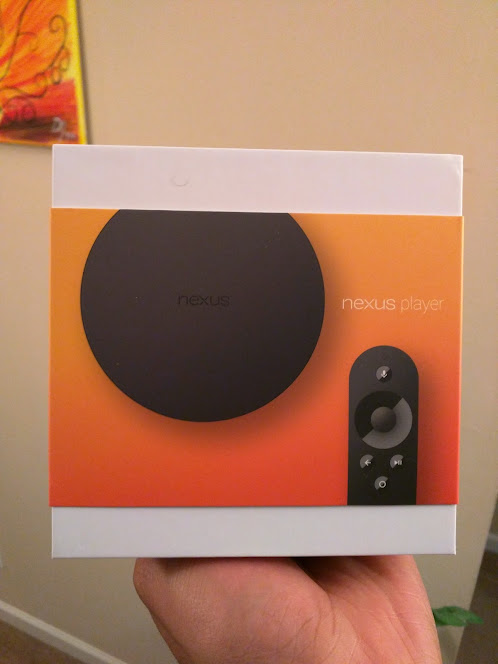
ASUS Nexus Player First Impressions

The Nexus Player by Asus and Google….is it a good device?  Or is it a great device?  First impressions are everything and one thing to note is that the UX is unbelievable.  Simply navigating through menus and available content is a breeze and very refreshing.  One thing notable about navigation is that it just makes sense.  There is absolutely little to no learning curve when it comes to using and operating the device – pick up the remote and go.

Content is something that will come.  Android TV is a new platform for developers to take advantage of; however, one notable addition out of the box is Hulu Plus, which Google TV never got.  The new Android Developer Studio makes it easy for developers to create applications for all screen sizes with ease – so let’s not freak out about this.  In addition, the selection of apps upon release is not bad at all, with a plethora of games and the media apps that are most popular, you will be fine.

The remote is another story.  Upon my first hands-on feel, this thing feels like it was made by a child.  Looking at the remote is one thing, pleasing; however, manipulating the screen with the remote works; yet, sometimes it is creaky and honestly feels cheap (this may be the break in period as I didn’t notice it too much after extended use).  Pairing the remote control is a breeze and happens almost instantaneously and you are ready to use your Nexus Player.

Full review to follow after more time.

Bottom line:  This is a great device that is a wonder to use.  With Google at the forefront the Nexus Player shines.  Overall rating of 8/10

Google Services “front and center” on Google devices

More and more lately while digging through reviews, there are instances of people jabbing Google (such as CNet) for making their services the highlighted ones on a device that IT is selling.  No one has ever complained that Apple forces you to use iTunes or that Amazon forces you to use their proprietary ecosystem — so why is Google being singled out here? Absolutely nothing new.

Singlehandedly, Google has taken the mobile industry by storm quickly catapulting Android to the forefront.  The company has had many “stabs” at the living room: Google TV, Nexus Q, Chromecast (which is great) and the newly introduced Android TV (this platform builds in the ability to cast in addition to full game support that can really bring a rich experience to the end user).


Nexus Player interface shown.

It seems more and more in reviews that Google just cannot get it right in the eyes of the reviewers at some tech centered websites and it needs to change.  Many often complain that it only has 8GB of storage, which is exactly the same amount as Apple TV and Amazon’s Fire TV.  Learn to see the promise of the vast ecosystem that google brings to the table and how it can potentially reshape the pathetic living room experience that is dominated by Comcast and Time Warner.

Wake up.