We’ve been waiting for an announcement that we knew was coming and it is now confirmed since the invites are out. The question is, is the cat out of the bag or does Apple have something up it’s sleeve at this point?
iPhone 7/7Plus
The iPhone has been a staple device in the lives on many for nearly 10 years and this year is no different. With subtle changes expected to be coming to the exterior and a new A10 chip powering it to make iOS even faster, this is surely going to be a spectacular decice. Additionally, rumors suggest that the iPhone 7 Plus model will contain a dual camera setup to be able to capture depth information similar to that of modern DSLR cameras — this is a big deal. A very big deal. Lastly, let’s talk about the elephant in the room….the lack of a headphone jack. Sorry kids, this is nothing to write home about. Supposedly the device is shipping with wireless “air pods” instead of the cabled mess that you’d normally receive.
I will not miss the 3.5mm jack.
Preview iOS 10 here:
Mac
The bustle has been “new MacBook Pros, new MacBook Pros” since Apple’s WWDC event where they were not released to the surprise of many. According to many sources, Apple was waiting on the Kaby Lake processors from Intel. There should be large changes to the MacBook Pro line with faster processors and a new macOS Sierra to power them.
Preview macOS Sierra here:
Watch
Apple Watch 2 is the buzz. Thinner, lighter and a bigger battery should power watchOS 3. Take a look at highlights of watchOS 3 here here (Source: iMore).
It has been an interesting journey for me in terms of smartphones, started off with a Palm Treo 650, next to a Windows Mobile device (I know), then the iconic Motorola Droid X, my first foray into Android. From there, I strictly purchased Nexus devices, starting with the Samsung Galaxy Nexus and purchased every one until the the Nexus 6…
So, with me being a huge Android user, enthusiast and aficionado — I decided it was time I stop the ill feelings towards iOS and all Apple devices, although I had respect for them — I just couldn’t like them. What did this mean? It meant purchasing my first Apple device, a gently used iPhone 5s and I enjoyed it, which lead me to sell it and buy an iPhone 6s Plus. Read more about my experience, which I documented, here.
First and foremost, the iPhone is smooth and very consistent in how tasks are done. Although there are sometimes ridiculous workarounds that you must take in order to perform a seemingly easy task on Android, at least it’s consistently ridiculous. Makes no sense right? Read on. I love that Android allows me to essentially do anything that I want to do on my smartphone — it’s a power user’s dream. However, it never feels good for an app to be swift and snappy one day, then have it hang and drop frames the next day. For what? Why? This is one of the things that I have never understood about Android, rather just put up with. For example, let’s look at two comparisons using the same app from each respective app store:
Google Hangouts on iOS opens in 1 second 10/10 times.
Google Hangouts on Android opens in 1 second 7/10 times, crashes once, opens in .5 second once, then takes 4-5 seconds the last time. These are the inconsistencies that I dislike, if the app can open in half a second once, why can’t it open up in that same speed all of the time?
This by no means indicates that Android is a bad mobile operating system; however, me as a critical and analytical user — I expect performance at all times and not just part of the time. This is especially true when it is a Google made app — simply infuriating.
This leads me into another point about the distinct difference between iOS and Android. iOS is touch first, while Android is process driven, which at times can cause a stark difference in behaviors.
Second, the iPhone is extremely optimized for the hardware. This does not take a rocket scientist to figure out; however, when things “just work” — I hate that saying, but it actually applies. You open an app with a expectation and usually it is met. One thing of importance here is that on paper the iPhone is not superior to even some mid-range Android devices; yet, it somehow outperforms most, if not all of them. For the longest, I could make almost any phone lag or experience latency, yet with my curreny device (which ALL smartphones experience lag) the latency is minut and not particularly stretched for long periods of time. With that being said you wonder how could a seemingly underpowered device compete and other times best a device with desktop like specifications? Most Android phones that you want to buy are shipping with configurations of 3/4 GB RAM and for them to still have issues in memory management is mind boggling. Yet, this leads me to question the architecture of the mobile OS itself. Being a Linux user, I see it consistently powering machines and managing resources extremely well, in fact much better than the other two big desktop OSes, but Android which is based off of the Linux kernel strays at times. This would infer that at some point during intial design of the operating system something got off.
Lastly, because of iOS, I am actually tinkering my phone less and less. Let me premise by saying that I work in technology, in operations. If anyone has ever been in an operational role — you know you are playing firefighter and I do not want to fight fires on my phone. I simply want to use it and put it away.
Bottom line: I cannot tell you what the best phone in the market is because instead of being the best, each of the top devices exemplify a quality that is the best versus having all qualities that are the best. I will say one thing I think is the best, Google’s services. So, regardless of what device I use, this suite of apps will always be on my device: GMail, YouTube, Google +, Google Keep, YouTube Creator Studio, Google Search (Now), Google Hangouts, Google Drive, Google Calendar and Google Wallet.
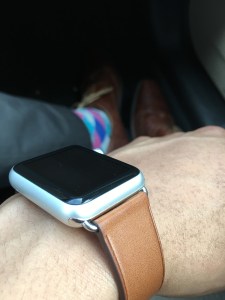
The Apple Watch, some view it as a fashion piece, others view it as a great notification center that allows for your phone to stay in your pocket thus making you more productive. In addition, some view it as a tool that should be used almost as a standalone device itself — either way, wearable technology is here to stay and this is one product that does a lot good while being slightly confusing at times, too.
Build Quality:
The Apple Watch comes in two sizes, 38mm and 42mm in 3 materials: aluminum for the Apple Watch Sport, stainless steel for the Apple Watch and 18-karat gold for the Apple Watch Edition. Size and composition make no difference in performance or OS setup on the watch — these are the same across the board. Other than that, I was concerned about the dial (dubbed by Apple as the digital crown) getting in the way and did not think that it would be useful at all; however, for creating watch-faces and manipulating the time forward or backward to view events past or present — it is useful and consequently your only choice. In addition to creation and time travel, it also serves as the Apple Watch home button when pressed by returning you to the previous screen.
Day to day use:
Using the Apple Watch is a “once you Apple Watch, you don’t go back” feeling and I believe the same can be said about most other smart watches. Having notifications on your wrist is always a big plus and while some find it nerdy or invasive is very forward-thinking. In my case, I dislike constantly taking my phone out of my pocket to see every notification and text. Responding and dismissing items from the watch is quick and easy, although it would be useful if an item could just be swiped away without the need of a confirmation.
Notifications present a very distinct vibration to your wrist without rattling your wrist off in addition to light sounds, which by default are on (you may want to disable these). Apple Watch also fully supports phone calls on the device itself, which I’ve never tried because of my deep Google Voice integration; however, trust me when I say, “it works.”
Like some, I begin my day in the gym and for me, that means steps are being counted, calories and being tracking while being burned and my fitness-self is being pleased. This is one feature that the Apple Watch just does well, even without a GPS, which over half of Android Wear devices don’t have either. Next, battery life is solid with me ending my day with usually 65% or more left. One note about battery life is that it is usually constant without any major variances from day to day.
Apps:
Apps on the Apple Watch automatically sync over upon the first booting and initial setup. Following setup, apps with a corresponding watch app appear on the apps screen after installation. Performance of the apps is not the best, usually performing well after they load, but loading itself is the problem — apps simply load slow. In some respect, I feel as if Apple wants us to engage in long sequences of interaction touching the watch, while I feel like the interface should be for short, quick activities. Both can work; however, app loading time would need to be sped up and further optimized to promote users wanting to interact with apps directly on the device more.
Pros:
Battery life
Standardized watch bands (Other smartwatch OEMs take note, please)
Fitness and health capabilities
Excellent Bluetooth connectivity
Cons:
Costly accessories
Slow loading apps
Takeaways: The Apple Watch is primed and ready to go. With a mostly positive experience, it is difficult for me to speak against purchasing an Apple Watch, especially if you’re an iPhone user — there is simply no better all-around wearable. Continual improvements in WatchOS will further optimize and streamline the experience. Also, did I mention standardized watch bands? These are phenomenal and are easy swappable, making personalizing your watch easy and fun.
iPhones, Galaxies, G4s, Xperias, Lumias, Moto — those are just a few of the names that you hear when it comes to that time of year for you to consider buying a new smartphone. First things first, let’s clear the air and recognize that Android 6.0 and iOS 9.2 will get you to the same destination, one may require more or less clicks, one may look better or worse and one may look the same or widely different depending on the device but the end result is the same.
Now that that is out of the way, let’s break down the important components of a smartphone purchasing decision:
Amount of money that you are willing to spend, Price.
Ecosystem preference.
Peripheral preference. (things like USB, lightning, etc.)
3rd party support.
Power user or simple user.
Price
Apple puts iOS on devices that they build — that’s it; so, in a nutshell, one must conform to their prices and they can get expensive. One thing to note is that Apple focuses on really marrying the software and hardware together to create one of the finest smartphone experiences that money can buy. When it comes to Android devices, prices fluctuate all over the place from the biggest flagships such as the Galaxy S6, Galaxy Note 5, HTC One M9 and more you will pay top dollar. However, there are mid-range devices that can sometimes give users just as good performance without completely emptying out your pocketbook.
One important note, do NOT buy a cheap Android device (something less than $250 or something sold in Walmart) then complain to all of your friends that Android is not a great operating system. The problem here is that you as a buyer, made a poor decision when buying your device (find another tech site willing to share that truth with you).
Quality and performance come at a price.
Ecosystem Preference
Some of us have large iTunes libraries with music going back to the days of the first iPod, while others cannot live without GMail, Google Keep, then you have others that simply need the embeded support of Microsoft’s suite of apps — everyone is different. With that being said,the Apple App Store and Google Play Store largely have the same apps and games; however, please expect most apps to be developed and arrive first on the Apple App Store. This is not due to an embedded hatred for Android it is due to the sheer number of devices that a developer has to account for when creating an app, versus iOS being on similar hardware at all times. One thing to note here is that Google typically makes all it’s it’s services available on multiple platforms while Apple does not — with the exception of Apple Music appearing in the Google Play Store.
The Windows Store is really missing key apps though, examples are Instagram, Google Chrome and more — this shows that developer support as well as user support really is not there.
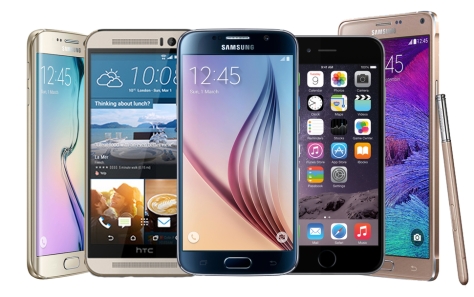
Popular smartphones from 2015.
Peripheral Preference
USB is an industry standard. Standards are good and are largely used and promoted by more open companies such as Google. Apple, although screaming of quality, locks the user in here with a lone lightning port on the device alongside a 3.5 mm headphone jack. Chargers and charging cables cannot be shared with anything that is not an Apple device.
Third Party Support
Literally everything you see from third parties are made to support Apple’s latest and greatest flagship device. As noted above, this does not happen because OEMs dislike Android or Google, it is because iOS is only on a select group of devices, while Android phones and tablets can come from literally any OEM that gets the required certification from Google and others who do not. Meaning, it is simply easier to adapt or provide an interface from an iOS device rather than account for each and every smartphone running Android.
Power user or Simple User
While some power users enjoy iOS, for those of you who love to tinker and have control of literally every part of your smartphone — the choice is simple, go with an Android device. However, with great power also comes great responsibility. Having an open platform means that you as the user could change a setting that leaves your device running a bit slower or even a bit faster. One can setup the homescreen in any manner that they like in addition to even creating custom gestures and assigning actions.
If you like to take the simple approach to a smartphone, you really don’t care about customizations other than a case and just want your device to work day in and day out — the choice is clear, go with an iOS device. The way that iOS and Android are built are fundamentally different and that is key here because apps only interact with so many layers of the operating system, which makes some apps somewhat limited; yet, this focuses in on providing a clean, consistent and sometimes less cumbersome experience.
Conclusion: The choice is yours! Do you have an unlimited bank account, do you like to trick out your homescreens or would you rather be consistent and reliable.
Two great ways to reach the same destination, just choose your ride!
Tech for the masses, meant to empower, educate and inform by Dexter Johnson.


 DexJohn's PC