Category Archives: Operating Systems

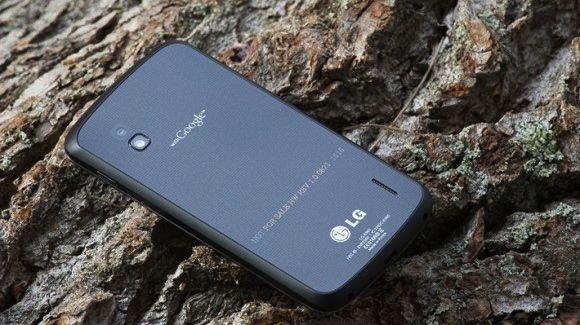
LG Nexus 4; Sold Out

One hour.  One hour is how long it took for Google’s latest Nexus flagship have it’s stock reduced to zero (both 8GB and 16GB versions).

That is pretty impressive.

If you tried to purchase the device there was error after error to be encountered. Some users even experienced Chrome crashing due to the Play Store being so overloaded. Though frustrating, those that showed perseverance have their orders now confirmed and they should have this beast of a smartphone sitting at their doorsteps in a matter of days to a week.

Bottom line: Congratulations to the lucky few. Great job Google on producing a wonderful device that consumers really want. One piece of advice stock up more so that everyone van get one!

Windows 8 Full Review

First and foremost, take any negative feelings you may have towards LEARNING, TRYING and EXPERIMENTING and please throw them out of the door.

On Thursday, October 25th 2012 Microsoft released an update to it’s desktop operating system — Windows 8.  Not only can this operating system, from this point further referred to as “OS”, sufficiently run just as Windows 7 did it now offers many new intuitive features that can easily make your productivity skyrocket.  Please note, as with anything you have those naysayers that seem to believe that this single iteration of the OS will be the end of Microsoft.  I can proudly say that they are indeed wrong.  This review will be broken up into sections that will be incredibly easy to parse through.

Installation:

I downloaded by copy of Windows 8 Pro to my desktop machine that was running Windows 7 on Friday.  Getting Windows is probably easier than it has ever been — now you can simply download it or request physical media.  So, before you are allowed to download the OS you must first run a setup tool, which will ensure that all of your applications will work with the Windows 8.  After these preliminary system requirement checks the the download begins, which weighing in at roughly 2 GB downloads pretty quickly in about 20 – 30 minutes.  Now comes the easy part, let your computer do the work.  Many are calling this the easiest Windows install yet; I can do nothing but agree.  After the installation is complete and the OS does it’s initial boot you traverse through the setup screens (signing in, determining your Start Menu preferences etc.) and you are all set to enjoy your new installation.

All in all the process took about 1.5 hours from initial download, payment and first time boot sequence.  After that you’ve never seen boot speeds this fast — but we will save that for later.

Windows 8 Desktop:

Many users, who probably have not even tried Windows 8, argue that Microsoft has neglected power users and are trying to abandon the desktop.  Let me start off by saying:  I am a power user, I sit in Microsoft SQL Server Management Studio for 8 hours per day, come home and use my machine to maintain websites, edit video/photo and more – we have not been neglected at all.

Why?

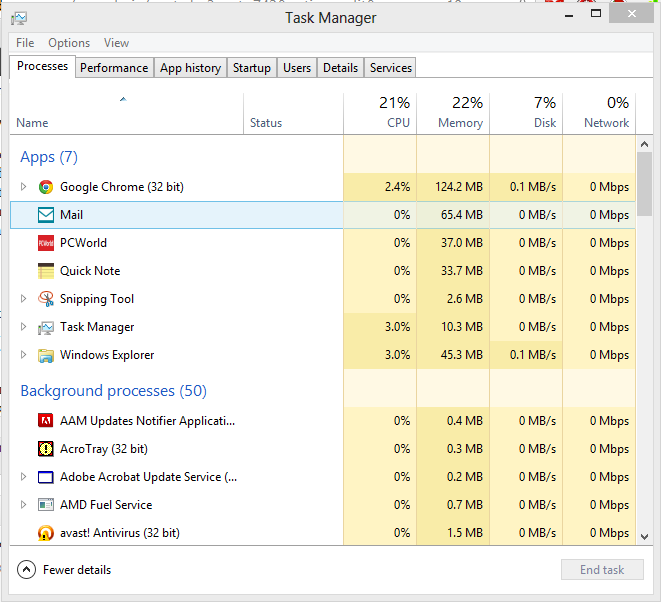
The desktop behaves in the exact same manner as it always has!  The exact same way.  Except now it has been completely overhauled; yet it still resides in the same shell.  The task manager is very intuitive for users that geek out over processes and how much memory is being consumed by a particular program.  It has a simple interface for a user just wanting to kill and application and an advanced look for those, whom like me, like to get a little dirty.

There is tab after tab available that will allow you deep-dive as much or as little as you would like and if you hate all of the details you can switch to the default with “Fewer details” as the lower left button indicates.  In addition, make note of how much memory your PC with Windows 8 consumes because it is touted that it uses much less memory, which I can say is true.  For example, Chrome is designed to run each tab in a separate process, which can be intense for an older machine — however with Windows 8 your memory will not wince   Although, I don’t encounter memory issues since my machine sports 12 GB of RAM.

Task Manager isn’t the only thing that has been improved, File Explorer has gone from simple to a ribbon filled Office-esque beast, which depending on what is selected can handle just about anything you throw at it.
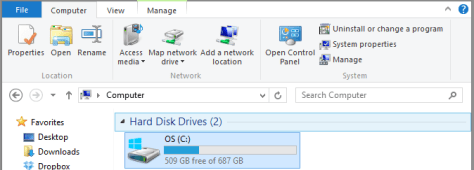
Speaking of improvements there is a slew of Administrative tools that can now be added to the Start Screen, which includes PowerShell, Services and Windows Firewall with Advanced Security just to name a few.  These applications are not what you would normally expect to receive from a Windows installation — these are robust applications that are fully capable of doing their jobs with or without 3rd party support.  Now, we all know that different vendors will create antivirus, firewall and anti-spyware apps that will take these features to the next level; yet, that is their specialty — Microsoft has done right by including applications that can get the job done just as well.

Start Screen and Windows Apps:

The first thing that you are greeted with after you sign into your new Windows 8 machine in the new start screen sporting the Modern UI from Microsoft.  Is it intuitive?  Yes.  Is it easy to use?  Yes.

Although the Start Screen allows for customization so that it may be setup however you’d like the first portion is initially for apps, which can be changed.  Don’t worry your desktop applications are not lost; a simple right-click and “All Apps” will reveal this lovely screen below:

As you can see nothing is lost.  The navigation might have changed but if you spend 30 minutes tinkering around and getting to know the new Windows you will be glad that you did.  Also, an app that gets used rigorously by me and everyone else “Desktop” is always available for you to visit at anytime; however, sometimes you just do not need to enter the desktop realm to do everything and Microsoft understands this — that is why there are apps available that can take care of many tasks for you ie. MetroTwit for Twitter, Quick Note for short blurbs.  In addition, these Windows apps can be pinned to a side of your screen for increased productivity.  See below:

So, this is just my case with one monitor — just imagine you could be coding on one monitor, have your favorite website up in another and have your Twitter feed pinned on that same monitor.  Windows 8 now has excellent built in multi-monitor support that now even extends the Taskbar; yet another improvement on the already present multi-monitor support found in Windows 7.

Let’s talk about apps.

Are the over 700K like Apples App Store?  No.  Are there over 700K like Google Play?  No.  However, answer this question for me with the hundreds of thousands of apps that these behemoths tout — how many do you ACTUALLY  use, everyday….  That number is probably slim.  The Windows Store is growing to say the least; yet, judging just by my Start Screen alone you can see that they already have some pretty key players:  Netflix, HuluPlus and Google Chrome — with more apps coming.  In fact, upon the release of Windows 8 1000 new apps were added.

My Final Thoughts:

Microsoft, Windows 8 is daring, almost scary good and I absolutely love it.  This OS is able to be used across multiple devices: tablets, desktops, phones; even the XBox 360 has adopted the Modern UI.  Traditional Windows (Windows 7) is the core of this operating system, so with this iteration you get everything that you know and love about it with the added benefits of fast boot and shutdowns (20 seconds or less), lower memory consumption and apps that can not only increase your productivity but even remove extra steps.  Want to search for anything on your computer?  Apps, files, Windows Store — it can be done all from the search.  Want to use all of your legacy applications you had installed before the upgrade?  They’ll be there waiting for you.  Want your external gadgets to work with the new OS?  It will.

At a price-point of $39.99 for a limited time, there is absolutely no reason to not upgrade; with it you’ll get improved performance and productivity.  Meet and Get Windows 8 [HERE]

For those of you who think this change is too radical and that this OS is so hard; do yourself a favor and give it a chance.

Microsoft has completely changed their image for this release, this is the new Microsoft they are here to stay and I like it.

Impending Android Announcement

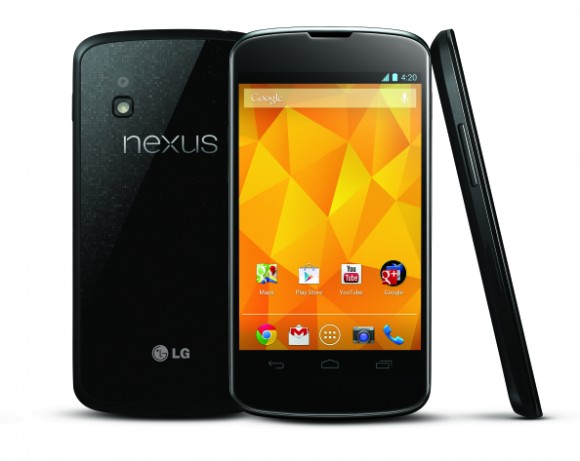
With Google’s latest Android announcement around the corner; Android fans, myself included, are on the edge of their seats.  There are many predictions to be had regarding what Google will show us on Monday, October 29th.

However, one thing is almost for certain:  We will see a new Nexus device.  What exactly does Nexus mean you ask?  Pure unaltered Android without lousy carrier or manufacturer modifications.  That means no extraneous bloatware can spoil yet another glorious Android device.  In addition, it is rumored that there will be a slew of new Nexus devices from many manufacturers just waiting to grace your pockets with stock Android greatness.  On the other hand, it would honestly be fantastic if Google would allow any OEM to “create” a Nexus device just by following strict guidelines:

  • No carrier installed apps
  • No Android UI changes
  • Meeting certain hardware specifications

Instantly we would have a variety of top-tier Android devices that were powered to get the job done.  This would be good for consumers as well as Google because it would put that confidence back to the Nexus name, which is one that Verizon almost put a black mark on by withholding system updates to their version of Samsung’s Galaxy Nexus.

Additionally, it is speculation that Google will refresh the Nexus 7 line by introducing a 32 GB model and potentially a model with 3G/4G support.  Speaking of powerful tablets; Samsung is rumored to be making a 10-inch Nexus tablet for our enjoyment.

On the other hand, this all boils down to a possible update to the Android operating system, which is currently at 4.1.2.  Yes, Android 4.2 (Key Lime Pie) is on the horizon.  Does Android need a new full-update or an incremental update.  Remember, Android 4.0 and 4.1 together have a combined marketshare of 25%; so, is this the best time for a new version to be released?  It seems that OEMs typically put either the latest or next to latest version of Android onto the devices they build so, just as a new version will be a good thing for us early adopters — how long will it take to penetrate the market?

Bottom line:  What happens at Google’s announcement will likely awe us.  Be prepared for a new Nexus device of sorts and if a new version of Android comes out, be prepared to sell it to your friends — let’s help take away market from Gingerbread ( Android 2.3) and give it to finer tuned versions of Google’s OS!

Should I root my Android device?

Rooting your Android device is certainly a question that should enter the brain of any technology and Android enthusiast.  Why?  The answer to that question is simple – pure, raw, unadulterated control of your device.  Sure, Android is pretty customizable stock from your OEM of choice:  Samsung, Motorola, HTC, LG and more; however, if you want to overclock, underclock, block ads (ALL ads) and most importantly, run custom ROMs, then rooting is certainly for you.

First off, rooting your device and unlocking your bootloader will VOID your warranty.  However, as you dive more into the world of root you will realize that everything you do to your device is completely reversible and if you ever want to return to stock (why be stock?), be un-rooted, and have your bootloader locked again.  On the other hand, after rooting you’ll never want to be without it again.

Google wants Android to be open; it is the OEMs and carriers that sometimes make it difficult to enjoy Android as it was meant to be.  How do they do this?

  • Over skinning of Android when it is absolutely astounding stock.  (Ie. Samsung’s TouchWiz, Motorola’s MotoBlur, and HTC Sense; making updates even harder for you to get — most claim this makes Android easier, but it isn’t hard if you just let users USE it.)
  • Carriers loading your phone with bloatware that can potentially slow your device down
  • Carriers taking their sweet time with the “testing” of an Android update (Ie. From ICS 4.0 to JellyBean 4.1)

However, since the acquisition of Motorola Mobility by Google, the latest Motorola devices are taking a more stock approach to Android and are being generally well received.

Pros of rooting your device:

  • More customizations
  • Custom ROMs, your phone will always be up to date with the latest version of Android as long as developers support it; hence why the Nexus line of devices is so popular.
  • Un-altered tethering
  • Backups (Who wouldn’t want a backup of their device?)
  • Removal of carrier bloatware
  • Ad blocking
  • New phone feeling; brings older devices back to life and makes new phone even better

When it comes to customizations I like to have complete control; take a look at my main homescreen on my Verizon Galaxy Nexus running AOKP Build 3:

Cons of rooting your device:

  • Bricking (When rooting and installing custom ROMs there is a possibility that you could render your device useless ie. a brick.  However, like everything you do you a technological device, it can be fully reversed.  If your device boot loops or a ROM installation goes awry, simply flash back to stock or just re-flash another ROM.  On the other hand, that is why creating a backup of your ROM is essential when you are an avid root and ROM-er.

Other than that, there is absolutely nothing wrong or bad about unlocking and rooting your device; in fact Google encourages it.  Why would the creator of this mobile OS stand-by and let users gain root access; simple because it is YOUR device — the same cannot be said of the other mobile operating systems out there that lock you into their “bubble”.

Bottom line:  Should you root your Android phone?  Yes, by all means go for it; enjoy a custom ROM, recovery, and more on your device; it is YOURS.  Rooting and ROM-ing is even more important for the Android purist, like myself, who enjoys the stock look of feel of this fun mobile operating system just as Google meant it to be.

iPhone 5, First Impressions and Hands-On

Apple you’ve done it again.  You have created a device which in turn, has been already been garnered as being a major success.  Congratulations is surely in order for a mobile device selling 2 million units in a timespan of 24 hours; however, is this device worth your money if you already have an Apple iPhone 4, 4S, or even an Android device?

This is certainly where things get tricky, the iPhone 5 does feature a larger rich display however, does this larger display feel awkward in the users hand?  This update also features panoramic photo capture, more powerful battery specs, LTE, better social networking integration, an improved Siri, and a few new minor updates (Apple is quoted at saying there are 200 improvements, which I believe is a lie).

In addition, let’s not forget Apple’s new mapping app which outed Google Maps as the default navigation for the OS, which has been a major thorn in their side.  This one app alone has caused a major backlash in the iOS user community.  Personally, I do have not had to use an Apple product since I had an iPad, but this switch by Apple even brothers me; so, I can only guess how a true Apple fan could feel when a half-baked app such as this sees light a little too early.  Apple even had the audacity to state that Maps will get better over time.  First and foremost, you should not include an application that is a “work in progress” and just expect your end users to just “deal with it”.  Google Maps is potentially the most robust mapping software on the planet, it certainly beats out the in house solution within iOS, which is already known for getting people lost and making others miss meetings.

When it comes to build quality iPhones are second to none; yet, with this release that same statement cannot be made.  Every iteration of this device has felt very solid in the hand, however when this one is being held it almost feels too light or even cheap.  On a lighter note, the brushings on the exterior of the device are virtually seamless and look fantastic.

View a hand-on demo here [Source: The Verge]

Bottom line:  If you are engulfed in Apple’s ecosystem is this a worthy upgrade?  That is a loaded question.  For some people, every iteration is a vast improvement.  However, this release has been surprisingly underwhelming in many aspects, one in particular is the fact that Apple has done nothing more than play catch up to industry standards and no real innovation was done.